
Directing data through the efficient route.
Path Optimization: Selecting the most preferred route to a destination.
First Listen: let your ears lead the way before your mind takes notes.
📻 FZ2CCNA Radio:
Then read: let your eyes explore before your mind starts to explain.
How a Cisco Router Picks the Best Path
Metric, Administrative Distance, and Longest Prefix Match
Imagine a router is a delivery manager trying to ship packages (packets) to different neighborhoods (networks).
It has three kinds of information to help it decide:
- Direct roads to neighborhoods (directly connected routes)
- A direct instruction from the logistics manager (static routes)
- Recommendations from Google Maps for different travel model:
- Driving
- Public transit
- Walking
- Cycling
- Flight
- Motorcycle
Different alternative routes like:
- Best route
- Avoid tolls
- Avoid highways
- Avoid ferries
- Prefer fuel-efficient (eco-friendly) routes
- Time-based alternatives (traffic prediction)
In networking, we have different routing methods:
- Static route
- Static Default route (route of last resort)
- Floating static route
- Static host route
- Dynamic routing protocols such as OSPF, EIGRP, and RIP
- Distance Vector
- Link-State
- Advanced Distance Vector
- Default route
- Directly connected route
These methods use different routing decision factors:
- Metric
- Administrative Distance
- Longest Prefix Match
The router’s job is to always choose the best delivery plan.
Metrics
How a Routing Protocol Chooses the Best Path. For example, when you use dynamic routing like RIP, OSPF, EIGRP, IS-IS or BGP; the router doesn’t guess: Each routing protocol calculates a number called a metric.
Metric = the cost score of a delivery route
Lower score = better route.
Different routing methods calculate scores differently:
- RIP uses hop count (how many routers you pass through — RIP allows only 15 hops)
- OSPF uses cost, mainly based on bandwidth
- EIGRP uses a composite metric (bandwidth + delay by default; can include reliability, load)
Why this matters
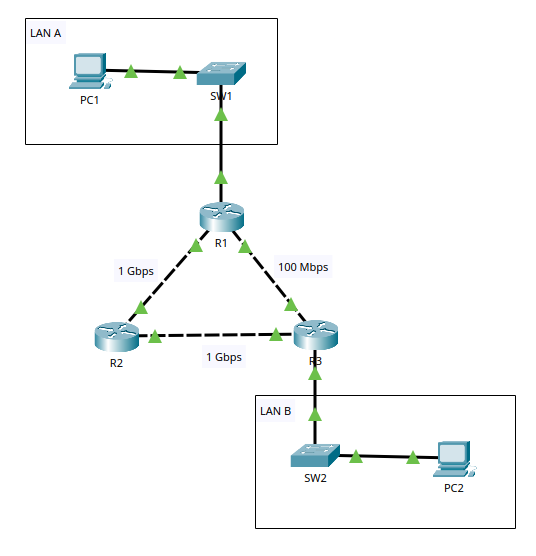
In the example topology:
Path A:
PC1 → SW1 → R1 → R3 (one hop, but slower 100 Mbps link)
Path B:
PC1 → SW1 → R1 → R2 → R3 (two hops, but faster 1 Gbps links)
Routing Information Protocol (RIP) is like a GPS app that only counts how many intersections:
It chooses R1 → R3 because it’s fewer routers (lower hop count).OSPF (Open Shortest Path First) and EIGRP (Enhanced Interior Gateway Routing Protocol) are both powerful dynamic routing. These two protocols are like a GPS app that cares about highway speed:
They choose R1 → R2 → R3 because the faster links produce a better metric.Key point
A routing protocol will always offer its own best route (lowest metric) to the router.
Administrative Distance
Now imagine the delivery manager receives route advice from multiple sources:
- A direct road sign (connected)
- A company logistic operation manager (static)
- Two GPS apps giving different routes (OSPF vs EIGRP)
The router needs a rule for deciding which source is more trustworthy.
That rule is Administrative Distance (AD).
- Administrative Distance = trust rating
- Lower AD = more trusted.
Think of it like this:
- AD 0 = I can literally see the neighborhood from here. (directly connected)
- AD 1 = The manager told me to go this way. (static route)
Common Cisco default AD values (CCNA favorites)
- Connected: 0
- Static: 1
- EIGRP (internal): 90
- OSPF: 110
- RIP: 120
What AD actually does important
Administrative Distance is only used when: Two or more sources offer routes to the exact same destination prefix
Example 1: AD is used (same network + same mask = same prefix)
A router learns the exact same destination prefix from two sources:
- OSPF: 172.16.1.0/24 via 10.0.0.1 (AD 110)
- Static route: 172.16.1.0/24 via 10.0.0.2 (AD 1)
These are ties because they are the same network (172.16.1.0) and the same mask (/24).
Result: The router uses Administrative Distance.
Static AD 1 beats OSPF AD 110
The router installs the static route.
Example 2: AD is NOT used (different prefixes = not a tie)
Now the router has these two routes:
- Static: 172.16.0.0/16 via 10.0.0.2 (AD 1)
- OSPF: 172.16.1.0/24 via 10.0.0.1 (AD 110)
Not the same prefix (one is /16, one is /24), so they are not competing.
Result: The router does NOT use AD to break a tie.
Both routes can be in the routing table.
When forwarding a packet to 172.16.1.50, the router uses Longest Prefix Match:
172.16.1.0/24 matches more specifically than 172.16.0.0/16
It forwards using the /24 OSPF route, even though its AD is higher.
AD chooses between equal prefixes.
Longest Prefix Match chooses between different prefixes.
The Router’s Route Selection Order (The Real Decision Flow)
In the delivery company, the manager decides in this order:
1 — Longest Prefix Match (Most Specific Neighborhood Wins)
Before anything else, the router prefers the most specific route.
Example destination: 10.10.2.3
Possible matches in the table — target host is 10.10.2.3
- 10.0.0.0/8 (matches first 8 bits)
- 10.10.0.0/16 (matches first 16 bits)
- 10.10.2.0/24 (matches first 24 bits)
The router chooses 10.10.2.0/24 because it’s the longest prefix match.
If you have:
Deliver to the whole city (/8) - A summary route that covers a very large address range = 10.x.x.x
Deliver to the north side (/16) - A subnet within a larger network = 10.10.X.X
Deliver to this exact neighborhood (/24) - A specific subnet that usually represents a LAN = 10.10.2.X
You pick the most precise address instruction: The longest prefix match always wins among routes already in the routing table.
2 — Administrative Distance (Most Trusted Source Wins)
If there are two routes to the same prefix length and same destination network (same prefix), the router chooses the route with the lowest AD.
Example:
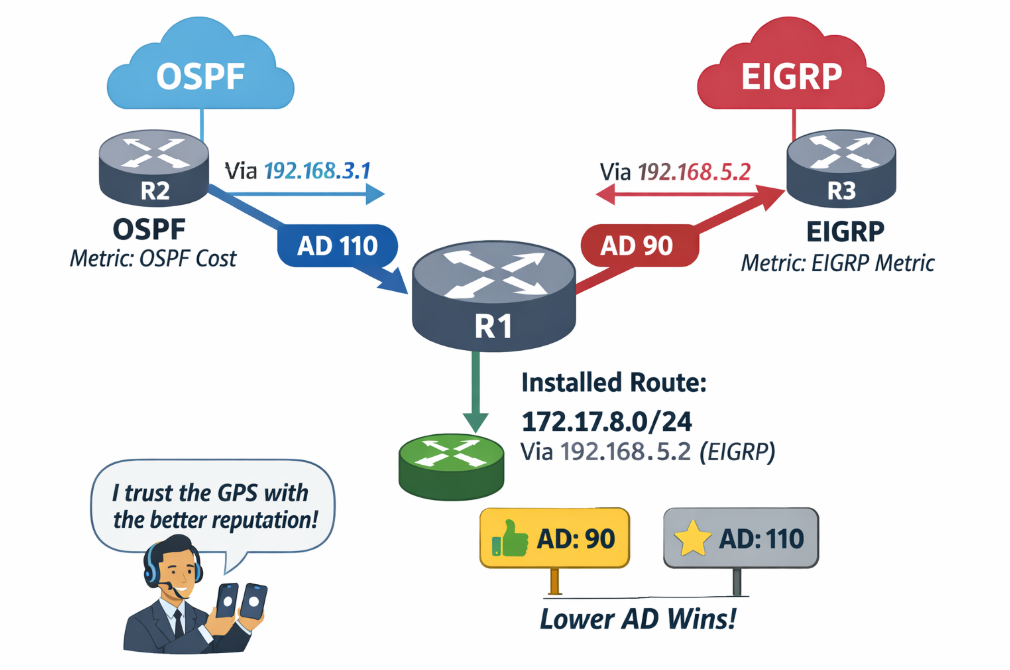
- R2 OSPF says best path to 172.17.8.0/24 is via 192.168.3.1 (metric decided inside OSPF)
- R3 EIGRP says best path to 172.17.8.0/24 is via 192.168.5.2 (metric decided inside EIGRP)
- Now R1 compares AD, not metric (because metrics are not comparable between different protocols):
EIGRP AD = 90
OSPF AD = 110
R1 installs the EIGRP AD 90 route.
Two GPS apps disagree. The manager trusts the app with the better reputation score (lower AD).
3 — Metric (Best Path Inside the Same Source)
If the routes are from the same routing source (example: two OSPF routes to the same prefix), then the router uses the metric to pick the best one. The same GPS app offers two options; choose the one with the lowest travel cost.
The Three Big Systems in a Cisco Router
Cisco routers have three working parts, like a delivery company:
1 Routing Processes (the GPS apps)
These are the running protocols:
- OSPF process
- EIGRP process
- RIP process
- etc.
Each one:
- learns routes
- calculates metrics
- offers its best routes to the router
2 The Routing Table (the manager’s master map)
This is the router’s official list of where each destination network is and how to get there.
It contains:
- connected routes
- static routes
- the best dynamic routes (after AD decisions)
3 The Forwarding Process (the delivery driver)
This part actually forwards the packet:
- Asks the routing table: Where should I send this?
- Uses the best match (longest prefix match)
- Forwards out the correct interface / next-hop
CLI: How to Verify All of This on Cisco IOS
Here are the key commands you should know.
See the routing table
show ip routeSee only OSPF routes
show ip route ospfSee only EIGRP routes
show ip route eigrpSee a specific destination route decision
show ip route 172.17.8.0Check routing protocol neighbors (health check)
OSPF:
show ip ospf neighborEIGRP:
show ip eigrp neighborsSee protocol details and AD info
show ip protocolsConfiguration Examples You Should Recognize
Static route (delivery company manager direct instruction)
enable
configure terminal
ip route 172.16.1.0 255.255.255.0 192.168.1.2
end
- enable: This command puts you into privileged EXEC mode.
- configure terminal or conf t: This command enters global configuration mode.
- ip route: This is the most important line. It creates a static route.
- 172.16.1.0 = This is the destination network (This is the network you want to reach).
- 255.255.255.0 = This is the subnet mask. Together with the network address, it defines 172.16.1.0/24
- 192.168.1.2 = This is the next-hop IP address. It is the neighbor router where traffic should be sent to reach 172.16.1.0/24
- end: This exits configuration mode. You return to privileged EXEC mode.
Floating static route (backup route)
You can intentionally make a static route less trusted by raising its AD, so it only appears if the main route disappears:
ena
conf t
ip route 172.16.1.0 255.255.255.0 192.168.1.2 200
end
- 172.16.1.0 = The destination network you want to reach.
- 255.255.255.0 = The subnet mask. Together, this means 172.16.1.0/24.192.168.1.2 = The next-hop IP address. This is the neighbor router where traffic should be sent.
- 200 = This is the Administrative Distance (AD). You are manually increasing the AD to 200.
Why is AD 200 important in this case?
- Normal static route AD = 1
- OSPF AD = 110
- EIGRP AD = 90
By setting the AD to 200, you are saying: Do NOT use this route unless all better routes are gone.
What to Memorize for the CCNA
The Route Selection Big Three
- Routing Processes (protocols)
- OSPF / EIGRP / RIP, etc.
- Learn routes
- Calculate metrics
- Advertise best routes
- Routing Table
- Router’s master list of routes
- Contains:
- Connected
- Static
- Best dynamic routes (after AD)
- Forwarding Process
- Forwards packets
- Consults routing table
- Longest prefix match
- Sends to correct next-hop/interface
- Longest Prefix Match (most specific prefix wins)
- Administrative Distance (lowest AD wins between sources)
- Metric (lowest metric wins inside the same source)
- Must-know AD values
- Connected: 0
- Static: 1
- EIGRP (internal): 90
- OSPF: 110
- RIP: 120
- Must-know metric ideas
- RIP: hop count
- OSPF: cost (bandwidth-based)
- EIGRP: bandwidth + delay (by default)
Exam Tips (How CCNA Questions Try to Trick You)
- If you see /24 vs /16 vs /8, the answer is almost always the longest prefix match.
- If you see OSPF vs EIGRP vs Static, the answer is usually administrative distance.
- If you see two OSPF paths (same prefix), then it’s about metric/cost.
- Remember: metrics from different protocols do not compete. The router doesn’t compare OSPF cost to EIGRP metric directly—AD decides which protocol’s route gets installed.
Summary
- A Cisco router is like a delivery operations manager
- Routing protocols calculate a metric to find the best path within that protocol (lowest metric wins).
- When different sources offer routes to the same destination, the router uses Administrative Distance to choose the most trusted source (lowest AD wins).
- When forwarding an actual packet, the router uses Longest Prefix Match to pick the most specific route.
What Did You Learn Today?
Let’s Find Out!
Instructions
- Select the correct answer for each technology concept.
- All questions pertain directly to the networking technologies explained.
- After answering, click “See Result” to see your score and feedback.
Grab the Lab and Test Your Skills
Documentation and topology (for this lab) — click here
[Return to CCNA Study Hub] — Next Stop: [Section 2 | Basic Router Interface Setup]