
Lab ID: LABS-PT-20260128-C9T1
Introduction
This lab is not pre-built. Build this entire lab in Packet Tracer. No templates ——you are responsible for the full topology and configuration. Prove it works by testing connectivity and validating every requirement. If you haven’t installed it yet or don’t know how to use Packet Tracer, go to: https://fromzerotoccna.com/packet-tracer/
Objective
You’re handed a small campus access setup and need to confirm what’s physically connected to what without trusting labels/cabling. You’ll use CDP to discover neighbors, verify port-to-port connectivity, and validate management IPs — then troubleshoot why one link isn’t showing up in CDP.
Goal: Use CDP to map neighbors + fix a CDP visibility issue.
Cable Connections (Required): You MUST use correct cable types (console/rollover, straight-through). Assume Auto-MDI/MDIX is disabled. Device Renaming (Required): Rename devices to R1, CORE-SW1, SW2, PC.
TOPOLOGY
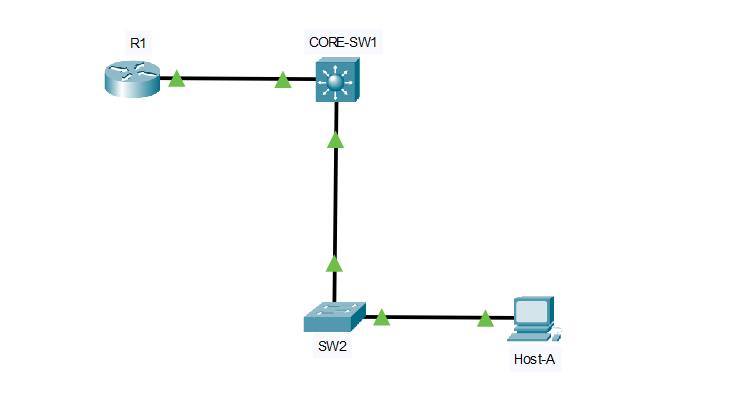
Suggested topology
Devices
- R1 = Edge router
- CORE-SW1 = Distribution/Access switch
- SW2 = Access switch
- PC1 on SW2
Links (with interfaces)
- R1 G0/0 (link to) CORE-SW1 G1/0/1
- CORE-SW1 G1/0/2 (link to) SW2 G0/1
- PC1 (link to) SW2 F0/1
Optional Mgmt (recommended for realism)
- SW1 VLAN 99 SVI: 192.168.99.11/24
- SW2 VLAN 99 SVI: 192.168.99.12/24
- R1 G0/0 (or subinterface) reachable in same mgmt segment (or just give it 192.168.99.1/24 for the lab)
(You don’t need VLANs for CDP to work, but mgmt IPs make the CDP output more meaningful.)
Intentional fault to inject
Inject CDP disabled on one side of a link so neighbors don’t appear where expected.
Example fault:
- On SW2, disable CDP globally or on the uplink interface:
- Global: no cdp run
- OR interface-level on SW2 G0/1: no cdp enable
Result:
- CORE-SW1 won’t see SW2 as a CDP neighbor on G0/2 (or it will be one-way depending on what you disable).
Key verification steps
Run these in order when troubleshooting:
On any device
show cdp
show cdp neighbors
show cdp neighbors detail
To confirm the exact local port and remote port mapping
show cdp neighbors(Look for Local Intrfce and Port ID)
To verify CDP is actually running
show cdp interface
show running-config | include cdp
If you suspect the link itself is down (not just CDP)
Diagnosis and fix
- Switch: show interfaces status
- Router: show ip interface brief
- Either: show interfaces <int>
What you should observe
- Healthy expected neighbor map
- R1 should see SW1 (and vice-versa)
- SW1 should see R1 on G0/1 and SW2 on G0/2
- SW2 should see SW1 on G0/1
Symptom of the fault
- show cdp neighbors on SW1 shows R1 but not SW2 on G0/2.
How to pinpoint the cause quickly
- Confirm the link is up:
- On SW1: show interfaces status → G0/2 should be connected
- Check if CDP is running globally and on the interface:
- On SW2:
- show running-config | include cdp
- show cdp interface
- On SW2:
Fix (depending on which fault you injected)
If CDP disabled globally on SW2:
- On SW2:
- conf t
- cdp run
- end
If CDP disabled only on the uplink interface:
- On SW2:
- conf t
- interface g0/1
- cdp enable
- end
Verify after fix
- On SW1: show cdp neighbors
- On SW2: show cdp neighbors detail (confirm SW1 mgmt IP + platform + port ID)
Commands I used
- show cdp neighbors
- show cdp neighbors detail
- show cdp interface
- show interfaces status (to confirm the link itself is up)
Known-good CDP outputs
Assumptions used in the sample
- Hostnames: R1, CORE-SW1, SW2
- Links:
- R1 G0/0 (link to) CoRE-SW1 G1/0/1
- CORE-SW1 G1/0/2 (link to) SW2 G0/1
- Optional mgmt IPs:
- SW1 VLAN 99: 192.168.99.11
- SW2 VLAN 99: 192.168.99.12
- R1 G0/0: 192.168.99.1
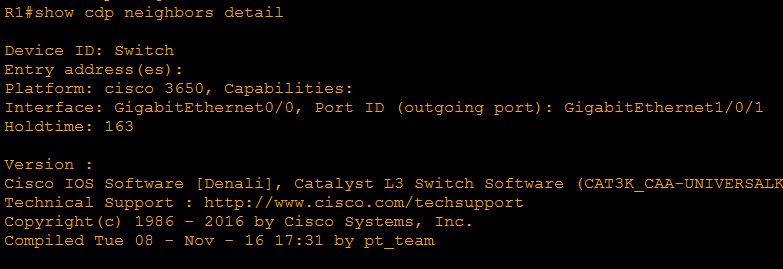
R1
show cdp neighbors

show cdp neighbors detail
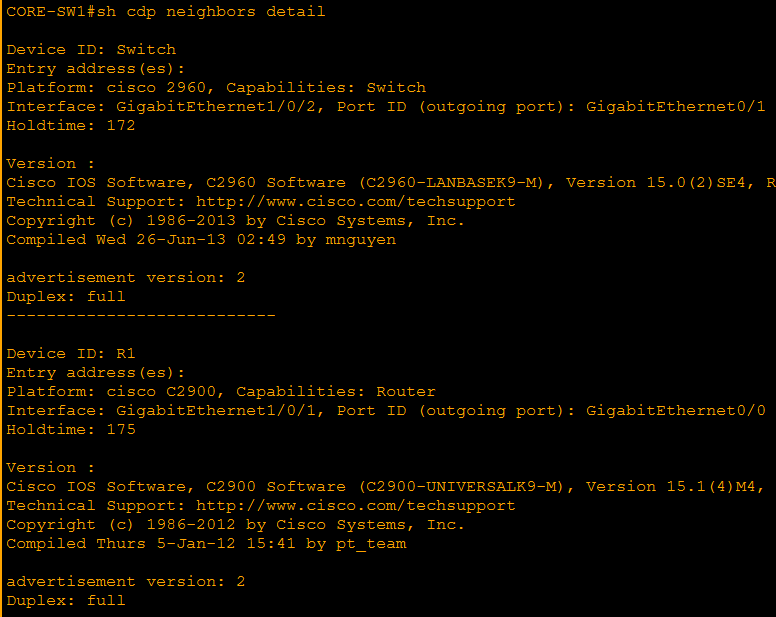
CORE-SW1
show cdp neighbors

show cdp neighbors detail
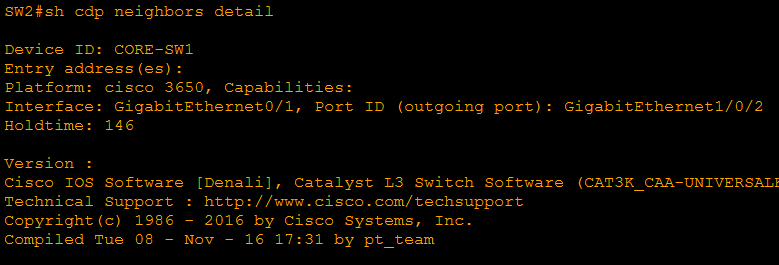
SW2
show cdp neighbors

show cdp neighbors detail
Quick sanity checklist
- Port IDs should match the cabling exactly.
- R1 should have 1 CDP neighbor: SW1
- SW1 should have 2 CDP neighbors: R1 and SW2
- SW2 should have 1 CDP neighbor: SW1
Next lab | Configure and Verify LLDP [click here]