
Native VLAN: Don’t Use for Users
Overview
In modern enterprise switching, the native VLAN still exists and still matters, but using it as a working VLAN for normal user traffic is mostly obsolete. On Cisco switches, the native VLAN is an 802.1Q trunk behavior, not a feature you can “remove.” It is the VLAN that:
- Receives untagged frames arriving on a trunk
- Sends frames untagged on the trunk by default (unless you tag the native VLAN)
Because of that, the modern goal is usually:
- Keep the native VLAN consistent on all trunks
- Set it to an unused VLAN (example: VLAN 999)
- Ensure it is not used for user endpoints
- Reduce the chance that untagged traffic causes outages or leaks
This approach treats the native VLAN as an exception-handling control, not as a production VLAN.
What Mostly Obsolete Means in Practice
The native VLAN is not obsolete. What’s mostly obsolete is:
- Carrying real user subnets and endpoints on the native VLAN across trunks
- Treating the native VLAN as just another VLAN that happens to be native
- Leaving it at defaults (like VLAN 1) and allowing it to carry meaningful traffic
In legacy designs, it was common for VLAN 1 (or another VLAN) to be both:
- The native VLAN
- A VLAN that carried management, user traffic, or both
That pattern creates avoidable risk. Today, it’s better to keep the native VLAN empty and use tagged VLANs for everything operational.
Why the Native VLAN Still Exists
802.1Q trunks must have a way to handle frames that arrive untagged. Even in well-managed networks, untagged frames can appear due to:
- Mispatching (access device plugged into a trunk)
- Incorrect trunk configuration on one side
- Third-party switches or appliances sending untagged frames
- Transient negotiation states (depending on platform and configuration)
The native VLAN defines the “bucket” where those untagged frames land.
Key behavior:
- Inbound untagged on a trunk to assigned to the native VLAN
- Outbound native VLAN traffic to untagged by default
So the native VLAN remains a necessary part of trunking, but you can design so that it’s not a functional production VLAN.
Don’t Use Native VLAN for Users
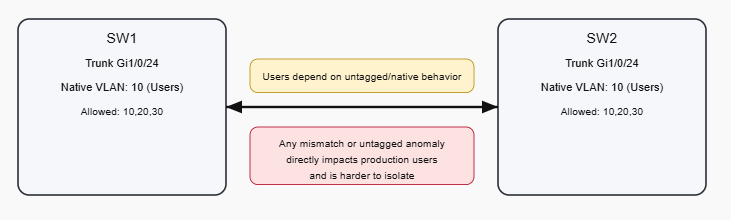
1) Native VLAN mismatches cause silent and disruptive issues
If SW1 has native VLAN 10 and SW2 has native VLAN 999:
- SW1 sends VLAN 10 frames untagged (as native)
- SW2 receives untagged frames and places them into VLAN 999
Result:
- VLAN leakage
- Wrong VLAN mapping
- MAC flapping
- Random user impact that looks like “ghost” switching issues
When the native VLAN is real user traffic, a mismatch becomes an outage. When the native VLAN is an unused VLAN, a mismatch is still bad but the impact is usually contained.
2) Untagged traffic is inherently less controlled
Tagged VLANs are explicit. Untagged frames are ambiguous and rely on native VLAN mapping.
If your network is designed so that normal traffic is always tagged:
- It is easier to reason about
- It is easier to troubleshoot
- It reduces accidental bridging into a production subnet
3) Security hardening is simpler when native VLAN is unused
A common hardening posture is:
- Don’t use VLAN 1 for native
- Use an unused VLAN (999) as native everywhere
- Do not assign access ports to that VLAN
This reduces exposure to:
- Accidental untagged frames joining a meaningful subnet
- Legacy assumptions about VLAN 1 being safe to keep around
4) Control-plane and management hygiene
Many environments avoid carrying anything important on the native VLAN so that:
- Network management traffic is explicitly tagged and scoped
- Trunks behave consistently even across mixed vendor gear
Modern Native VLAN: Blackhole
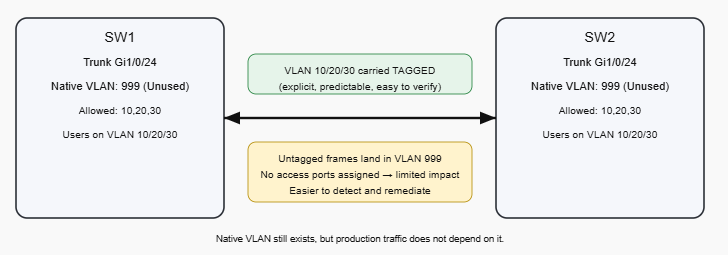
The current best practice on Cisco campus networks is to configure:
- Native VLAN = unused VLAN (e.g., 999)
- No access ports in VLAN 999
- All real traffic uses tagged VLANs
- Allowed VLAN list is explicit
This does two things:
- If untagged frames appear, they fall into an empty VLAN
- Your production VLANs are carried tagged, which is explicit and easier to validate
Blackhole Native VLAN + Tagged Production VLANs
Cisco Configuration
1) Create the unused native VLAN
vlan 999
 name NATIVE-BLACKHOLE
2) Configure trunk ports deterministically
interface GigabitEthernet1/0/24
 description Uplink-to-SW2
 switchport mode trunk
 switchport trunk native vlan 999
 switchport trunk allowed vlan 10,20,30
3) Disable DTP negotiation when appropriate
If the trunk is to a known device and you want to avoid negotiation side effects:
interface GigabitEthernet1/0/24
 switchport nonegotiate
Use this only when you have trunking explicitly configured on both sides.
4) Optional: Tag the native VLAN (if supported and standardized)
Some environments choose to tag the native VLAN to reduce reliance on untagged behavior:
vlan dot1q tag nativeThis should be treated as a design decision you apply consistently, because it changes how frames are transmitted on trunks.
Troubleshooting Tools and Methods
Verify trunks and native VLAN alignment
Run on both ends:
show interfaces trunk
show interface gi1/0/24 switchport
Look for:
- Trunking status is on
- Native VLAN matches (999 on both ends)
- Allowed VLAN list is correct and consistent
Detect unexpected untagged traffic
If VLAN 999 is truly unused, it should learn little or nothing.
Check MAC learning:
show mac address-table vlan 999
show mac address-table interface gi1/0/24
If you see MAC addresses learning in VLAN 999:
- Something is sending untagged frames into the trunk
- Or you have a mispatch / misconfig on an adjacent device
Use logs and neighbor discovery for mismatch clues
If CDP is enabled, Cisco often warns on native VLAN mismatch.
Useful commands:
show cdp neighbors detail
show logging | include NATIVE|VLAN|CDP
Spanning Tree checks (to confirm stability)
show spanning-tree interface gi1/0/24 detail
show spanning-tree vlan 10
show spanning-tree vlan 999
If VLAN 999 shows unexpected STP activity, that can be a hint that untagged control traffic is showing up where it shouldn’t.
Recommended Operational Rules
- Do not use the native VLAN for user endpoints
- Set native VLAN to an unused VLAN across all trunks
- Keep the native VLAN consistent on every trunk
- Use explicit allowed VLAN lists
- Standardize trunk configs and validate with
show interfaces trunk - Treat MAC learning in the unused native VLAN as a fault indicator
Quick Checklist
- Native VLAN is set to 999 (or another unused VLAN) on all trunks
- VLAN 999 has no access ports
- Production VLANs are carried tagged
- Allowed VLAN lists are explicit and consistent
- No unexpected MAC addresses are learned in VLAN 999
- No native VLAN mismatch messages in logs/CDP
Conclusion
Using the native VLAN for normal user traffic is mostly obsolete because it makes production connectivity depend on untagged trunk behavior, which is harder to control, easier to misconfigure, and more disruptive when mistakes occur. The native VLAN still exists for 802.1Q trunking, but the modern Cisco approach is to configure it as an unused “blackhole” VLAN and carry real traffic using tagged VLANs with explicit allowed VLAN control.
Say hi or ask a question: fromzerotoccna@gmail.com