
Your 8-Month CCNA Plan
Starting January 2026
Before you start in January, make three important decisions:
- Choose your main study material
(Cisco Press book, video course, or NetAcad — pick ONE main source) - Choose what videos you will follow
(Jeremy’s IT Lab, Neil Anderson, or David Bombal) - Choose what practice exams you will use
(Boson, Pearson, or free practice tests)
Once you make these three decisions, stick to your material and follow this plan.
If you stay consistent, everything will go well for you.
This plan assumes you begin Monday, January 5, 2026 — the first full week of the year.
It carries you month-by-month until August 2026, when you’re ready to take the exam with confidence.
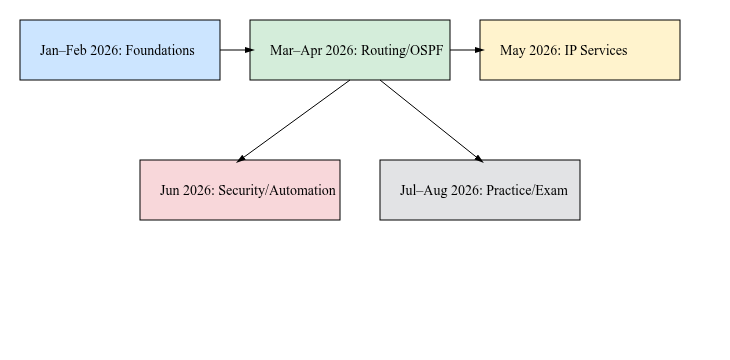
January 2026 — Month 1: Warm Up & Build Your Foundation
January is the month to start slow, steady, and relaxed.
It’s your get comfortable with networking phase.
You learn:
- What networks are
- How devices talk
- IPv4 & IPv6 basics
- Subnetting (very light for now)
- Basic Cisco IOS navigation
Your only job in January: Get familiar with the environment and build confidence.
Small labs:
- Ping between two PCs
- Assign an IP address
- Use basic
showcommands
You’re building momentum — not rushing.
Tools: Packet Tracer
Try creating these labs on your own:
- Basic device navigation (
enable,show,config t) - Build a small LAN (PC → Switch → PC)
- Assign IP addresses
- Ping and ARP test
- Save configs
Goal: Get comfortable with IOS and basic networking.
February 2026 — Month 2: Subnetting + VLANs + Trunking
Now you start feeling like a network tech.
You learn:
- Subnetting (daily short practice)
- VLANs
- Access ports vs trunk ports
- Router-on-a-stick
- Basic wireless concepts
Your goal for February: I can build a small network from scratch.
Labs:
- Create 3 VLANs
- Configure trunking
- Enable inter-VLAN routing
This month your skills jump fast — and it feels amazing.
Tools: Packet Tracer
Try creating these labs on your own:
- Create VLANs
- Assign ports to VLANs
- Configure trunk links
- Router-on-a-stick
- Subnetting practice network
Goal: Build multi-VLAN networks with confidence.
March 2026 — Month 3: Routing Basics
March is the month where you begin to think like a router.
You learn:
- Static routes
- Default routes
- IPv6 routing
- How routers choose next hops
Your goal for March: I understand how packets find their way.
Labs:
- Build a 3-router line
- Add static routes
- Break the network and fix it
You will feel your confidence grow a lot this month.
Tools: Packet Tracer
Try creating these labs on your own:
- 3-router static route lab
- Default routes
- IPv6 static routes
- Routing table exploration
Goal: Understand how routers choose paths.
April 2026 — Month 4: OSPF, the Heart of the CCNA
April is your OSPF month — the most important routing protocol for CCNA.
You learn:
- OSPFv2 & OSPFv3
- Neighbor states
- Costs & metrics
- How OSPF reacts to link failures
Your goal for April: I can configure and troubleshoot OSPF without fear.
Labs:
- Multi-router single-area OSPF
- Adjust cost values
- Test convergence
This month transforms you from beginner to real network student.
Tools: Packet Tracer
Try creating these labs on your own:
- Basic OSPF single-area setup
- OSPF neighbor states
- OSPFv3 (IPv6)
- Change interface cost
- Link failure test
Goal: Feel confident configuring and fixing OSPF.
May 2026 — Month 5: Real-World IP Services
May is when you start feeling like a professional.
You learn:
- NAT (PAT, static, dynamic)
- DHCP server & relay
- NTP
- Syslog
- SNMP
- Basic QoS
Your goal for May: I finally understand services used in real companies.
Labs:
- DHCP pools
- NAT overload (PAT)
- Syslog with timestamps
Everything you learn here appears often in CCNA exams.
Tools: Packet Tracer
Try creating these labs on your own:
- DHCP server + relay
- NAT/PAT
- Static NAT
- Syslog
- NTP
- DNS basics
Goal: Learn services used in real networks.
June 2026 — Month 6: Security + Automation
June strengthens your engineering mindset.
Security topics:
- Standard & extended ACLs
- Port security
- DHCP snooping
- Dynamic ARP Inspection
Automation topics:
- JSON basics
- REST APIs
- SDN controllers (conceptual)
Your goal for June: I can protect and automate basic parts of a network.
Labs:
- ACLs to filter traffic
- Port-security sticky MAC
- DHCP Snooping
Great month for hands-on practice.
Tools: Packet Tracer + DevNet Sandbox
Try creating these labs on your own:
- Standard ACLs
- Extended ACLs
- Port-security
- DHCP Snooping
- Dynamic ARP Inspection
Free automation labs:
- Basic API call (DevNet Always-On)
- JSON output exploration
Goal: Protect and automate simple networks.
July 2026 — Month 7: Full Review + Exam Muscle
July is your training camp.
You don’t learn new topics — you polish what you already know.
You do:
- 1 practice exam each week
- Identify weak spots
- Rebuild main CCNA labs
- Review routing, VLANs, NAT, ACLs
Your goal for July: I can answer CCNA questions quickly and calmly.
Tools: Packet Tracer
Try creating these labs on your own:
- Full branch network (VLANs + OSPF + NAT + ACLs)
- Troubleshooting lab
- Build a network from scratch
- Subnetting challenge network
Goal: Mix everything and gain speed.
August 2026 — Month 8: Final Prep + Exam Time
August is your final step.
This is where you sharpen your timing and build confidence.
Tasks:
- 2 practice exams per week
- Subnetting drills (10 min/day)
- Light labs to stay fresh
- Schedule exam for the last week of August
Your goal for August: Yes. I am ready to pass CCNA.
Tools: Packet Tracer
Try creating these labs on your own:
- Timed 30-minute configuration drills
- OSPF + NAT + ACL final challenge
- Switching rapid review
- IPv6 quick labs
Goal: Be fast, calm, and ready for the exam.
A final message for you, starting January 2026
January is not just the beginning of a year — it’s the beginning of your CCNA journey.
You don’t need to rush.
You don’t need to know everything.
You just need to show up, week after week.
By August 2026, you will look back and think: I started in January knowing almost nothing… and now I can configure real networks.
And that feels incredible.
Questions, comments, or just wanna drop a ‘hey’?
Email: fromzerotoccna@gmail.com