
CDP and LLDP enables rapid network mapping and issue resolution by identifying immediate neighbors.
📻 FZ2CCNA Radio:
Identify neighbors and map connections
Network Topology Discovery with CDP and LLDP
This section describes how network engineers use CDP and LLDP to discover directly connected devices, validate cabling, and accelerate troubleshooting while managing security risks and applying real-world best practices.
Why Neighbor Discovery Is Important
In production networks, documentation can be outdated, incomplete, or missing. During incident response and change windows, engineers need fast, defensible answers to questions like:
- What device is connected to this port right now?
- Which remote interface does this link terminate on?
- What is the neighbor’s role (switch/router/AP/phone/server)?
- What platform/model is it (capability expectations)?
- What management address can be used for remote access (SSH/HTTPS)?
Neighbor discovery protocols provide this information at Layer 2, which means they can work even when IP connectivity is not yet established or routing is impaired.
Common Technical Characteristics (CDP and LLDP)
Both CDP and LLDP share these engineering-relevant behaviors:
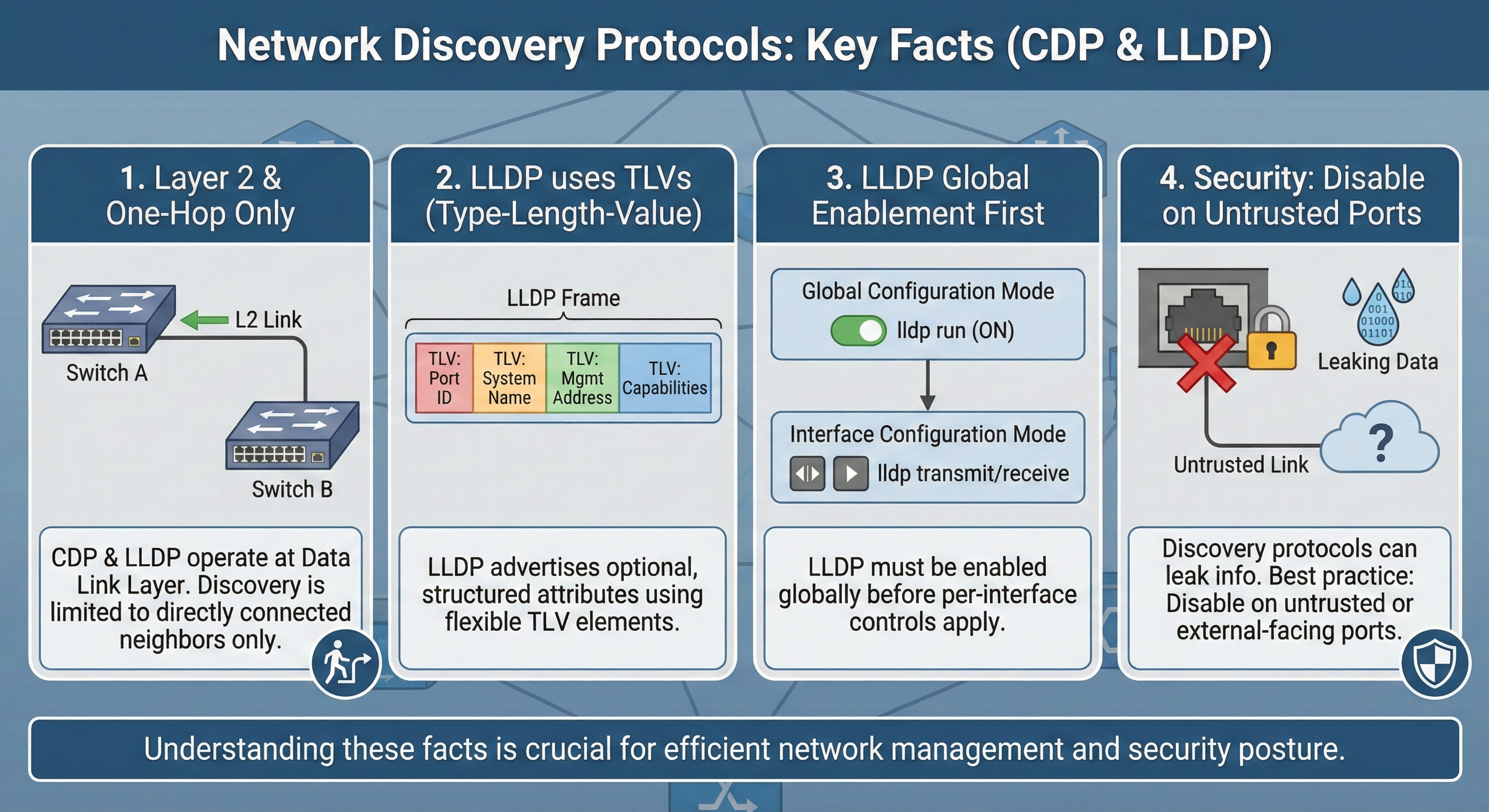
- One-hop only: They reveal only directly connected neighbors. They do not discover devices multiple hops away.
- Layer 2 operation: Discovery is independent of routing. A link must be up, but IP routing is not required.
- Periodic advertisements and aging: Neighbors are learned from periodic messages. Entries remain valid for a hold time / TTL, then age out if updates stop.
- No authentication by default: Neighbor identity data is typically available to any device that can receive the frames on that link. This creates information disclosure risk.
Cisco Discovery Protocol (CDP)

What CDP Provides
CDP is Cisco proprietary and commonly enabled by default on Cisco platforms. It builds a neighbor table with key fields:
- Device ID (neighbor hostname)
- Local interface (your interface)
- Port ID (neighbor interface)
- Capabilities (router/switch/phone/etc.)
- Platform/model
- Often a management IP address (commonly in show cdp neighbors detail)
CDP Configuration Controls
Global enable/disable
R1(config)# cdp run
R1(config)# no cdp run
Rule: If CDP is disabled globally (no cdp run), per-interface enabling will not take effect.
Interface enable/disable
R1(config)# interface s0/0/0
R1(config-if)# cdp enable
R1(config-if)# no cdp enable
Core CDP Operational Commands
- show cdp
Confirms global status and timers. - show cdp neighbors
Quick mapping: local interface | neighbor device ID | neighbor port ID, plus capabilities/platform and holdtime. - show cdp neighbors detail
Used when you need neighbor Layer 3 info (often management IP), plus more detailed identity/version/platform details. - show cdp entry <device-id>
Filters large neighbor tables to a single neighbor. - show cdp interface
Confirms which interfaces are participating in CDP. - show cdp traffic
Validates CDP send/receive behavior and helps isolate local sends but doesn’t receive cases.
Security Risks and Best Practices (CDP)
Primary risk: information disclosure
CDP can expose:
- Hostnames
- Device model/platform
- Capabilities/role
- Software version details (in detailed outputs)
- Potentially management IP addresses
This information can assist unauthorized reconnaissance and speed targeted attacks.
Best practice policy (typical enterprise)
- Enable CDP only on trusted infrastructure links
- switch-to-switch
- switch-to-router
- uplinks to wireless infrastructure (where appropriate)
- Disable CDP on user-facing/access ports
- end-user ports
- guest areas
- public spaces
- any untrusted edge
Example:
SW1(config)# interface range fa0/1 - 24
SW1(config-if-range)# no cdp enable
In high-security environments, CDP may be disabled globally and replaced with controlled alternatives (LLDP with restrictions, NAC/802.1X, or inventory tools).
Link Layer Discovery Protocol (LLDP – IEEE 802.1AB)
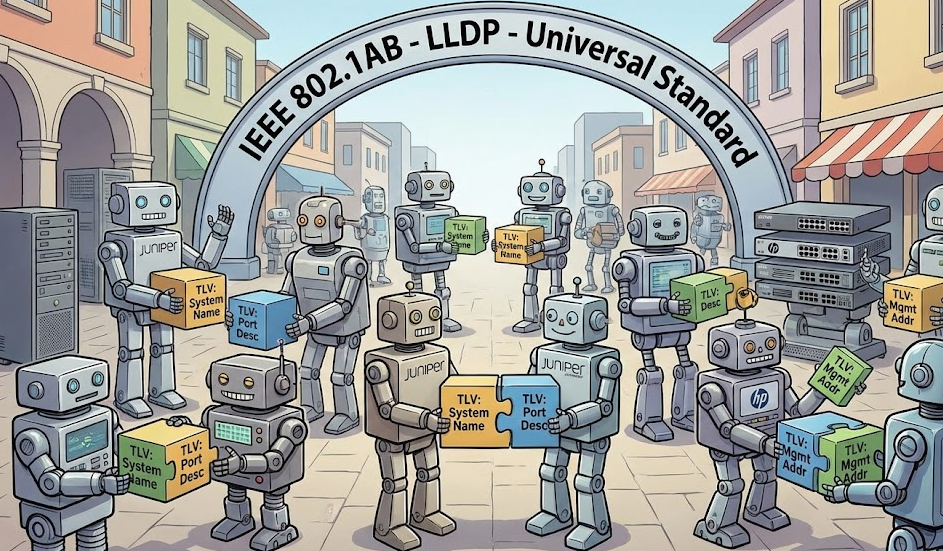
Why LLDP Exists
LLDP is the vendor-neutral discovery protocol standardized by IEEE 802.1AB. It is the correct tool when you must discover neighbors that are not Cisco (Juniper, Aruba, HP, Linux servers, etc.).
LLDP runs at the data link layer, allowing devices using different network-layer protocols to still learn about each other.
LLDP Information Model: TLVs (Type-Length-Value)
LLDP advertisements carry structured attributes called TLVs (Type-Length-Value). TLVs allow devices to include optional and extensible information elements.
From an engineering standpoint, TLVs explain why LLDP is interoperable and flexible:
- Devices can include a common baseline set of TLVs
- Vendors can include additional TLVs without breaking compatibility
Commonly advertised TLVs (high operational value)
- Management address: IP used to manage the device (SSH/HTTPS/SNMP)
- System capabilities: device functions and feature categories (router/bridge/AP/phone/etc.)
- System name: configured hostname
LLDP can also advertise interface-level and configuration-related details depending on platform and policy.
LLDP Behavior
LLDP devices exchange information only with other LLDP-enabled devices. If a neighbor does not run LLDP (or transmit/receive is disabled), it will not appear in the LLDP neighbor table.
LLDP Configuration Guidelines and Limitations
LLDP commonly has these operational constraints:
- Must be enabled globally before interface-level control is possible
- Supported only on physical interfaces
- Typically discovers one device per port
- Can discover Linux servers (common in data center environments)
These points matter when interpreting results, especially on port-channels, virtual interfaces, tunnels, or when multiple devices sit behind an unmanaged device.
LLDP Configuration (Cisco IOS / IOS-XE style)
Global enable/disable
R1(config)# lldp run
R1(config)# no lldp run
Interface transmit/receive control
R1(config-if)# lldp transmit
R1(config-if)# no lldp transmit
R1(config-if)# lldp receive
R1(config-if)# no lldp receive
Default behavior: After enabling LLDP globally, many Cisco platforms enable LLDP transmit and receive on all supported interfaces by default. In hardened environments, engineers often explicitly set transmit/receive policies per interface.
LLDP Verification Commands
Show neighbors
R1# show lldp neighborsThis output typically includes:
- Device ID
- Local interface
- Hold time
- Capabilities
- Port ID (remote interface)
Example:
R1#show lldp neighbors
Device ID           Local Intf     Hold-time  Capability      Port ID
DSW2                Et0/2          120        R               Et0/2
DSW1                Et0/1          120        R               Et0/2
Interpretation:
- R1 has two LLDP neighbors (DSW1, DSW2)
- Local interfaces are Et0/1 and Et0/2
- Both neighbors advertise routing capability (R)
- Remote termination ports are shown in Port ID
Operational caution: LLDP only shows neighbors that both support LLDP and are configured to exchange (transmit/receive) on those ports.
CDP vs LLDP
| Attribute | CDP | LLDP |
| Standard | Cisco proprietary | IEEE 802.1AB |
| Vendor support | Primarily Cisco-to-Cisco | Multi-vendor |
| Layer | Layer 2 | Layer 2 |
| Scope | One-hop neighbors | One-hop neighbors |
| Default state | Often enabled by default on Cisco | Often requires explicit enable |
Practical guidance:
- Use CDP when the environment is Cisco-dominant and you want fast Cisco-native neighbor mapping.
- Use LLDP when the environment is mixed-vendor, includes servers, or you need standardization.
Real-World | Best Practices
Define a port-based discovery policy
A defensible production policy usually looks like:
- Infrastructure links: discovery enabled (CDP and/or LLDP)
- Access/untrusted ports: discovery disabled (especially transmit)
- Unused ports: shutdown + isolated VLAN + discovery disabled
Minimize information leakage
Because discovery protocols can advertise management addresses and platform details:
- Disable discovery on untrusted edges
- Consider receive-only posture (where supported/appropriate)
- Restrict device management access (AAA, TACACS/RADIUS, mgmt VRF, ACLs)
- Ensure logs and configs are protected (change control)
Use discovery as a validation tool, not as documentation
CDP/LLDP reflects current state. After changes, update diagrams and inventory systems to avoid repeated rediscovery work during every incident.
Troubleshooting Workflow
Use this sequence to reduce guesswork:
Verify link is up
show ip interface brief
show interfaces <id>
Verify protocol is enabled globally
CDP
show cdpLLDP
show lldp(if supported on the platform) or validate configuration lldp run
Verify interface-level participation
CDP
show cdp interfaceLLDP
show lldp interfaceCheck traffic counters when available
CDP
show cdp traffic(LLDP counters vary by platform)
Interpret results correctly
- If CDP shows nothing, but you suspect a non-Cisco neighbor, use LLDP.
- If LLDP shows nothing, confirm the neighbor is LLDP-enabled and that transmit/receive is allowed on both ends.
- If sent frames increase but received frames do not, isolate whether the neighbor is not sending, is blocked by policy, or the link is not actually connected where expected.
CCNA Exam Tips
Commands to memorize
- CDP:
- show cdp
- show cdp neighbors
- show cdp neighbors detail
- no cdp run
- no cdp enable
- LLDP:
- lldp run
- show lldp neighbors
- show lldp neighbors detail (platform dependent)
- lldp transmit / lldp receive
Essential Technical Comparison: CDP vs LLDP
| Topic | CDP (Cisco Discovery Protocol) | LLDP (Link Layer Discovery Protocol) |
|---|---|---|
| Ownership / Standard | Cisco proprietary | IEEE 802.1AB (multi-vendor standard) |
| OSI Layer | Layer 2 (link-local discovery) | Layer 2 (link-local discovery) |
| Primary purpose | Advertise device + port identity/capabilities to directly connected neighbors | Same, but standardized via mandatory TLVs and optional extensions |
| Where it works | Best in Cisco-only environments | Best in multi-vendor environments |
| Frame type / encapsulation | L2, typically over 802.2 LLC + SNAP (not IP) | L2 Ethernet, EtherType 0x88CC |
| Destination MAC (common) | 01:00:0C:CC:CC:CC | 01:80:C2:00:00:0E (link-local group MAC) |
| Link-local behavior | Stays on the local link; not routed | Stays on the local link; not routed |
| Data format | TLV-based (Type–Length–Value) | TLV-based; strict structure with required TLVs |
| Must-include fields | Vendor-defined set; usually includes device/port/capabilities | Mandatory TLVs: Chassis ID, Port ID, TTL; plus End-of-LLDPDU |
| Typical info discovered | Device ID (hostname), platform/model, OS version, capabilities, mgmt IP, local/remote port IDs, (often) native VLAN on trunk, duplex info | Chassis ID, Port ID, System Name/Desc, Capabilities, Mgmt Address; optional TLVs for VLAN/PHY/PoE/inventory depending on vendor/extensions |
| Voice / endpoint extension | Cisco phones often rely on CDP for voice VLAN in Cisco-only designs | LLDP-MED (Media Endpoint Discovery) for phones/APs: network policy (voice VLAN/QoS), location (E911), power info, inventory details (vendor-dependent) |
| Timers (common defaults you’ll see) | Advertise ~60s, holdtime/TTL often ~180s (platform-configurable) | Advertise commonly ~30s, TTL often ~120s (platform-configurable) |
| Fast-start behavior | Varies by platform/feature; not as consistently standardized as LLDP | Common feature: fast-start burst when link comes up / changes (vendor-implemented; often multiple rapid advertisements) |
| Neighbor table concept | Maintains neighbors + TTL per interface | Maintains neighbors + TTL per interface (local LLDP agent state) |
| What you troubleshoot with it | Fast topology mapping; “what’s on the other end of this port”; trunk/native-VLAN mismatch (very handy on Cisco) | Same topology mapping; especially useful across vendors; endpoint policy via LLDP-MED |
| Key Cisco show commands | show cdp neighbors / detailshow cdp interfaceshow cdp traffic | show lldp neighbors / detailshow lldp interface(often) show lldp traffic (platform-dependent) |
| Enable/disable globally (Cisco IOS/IOS-XE) | cdp run / no cdp run | lldp run / no lldp run |
| Enable/disable per interface | cdp enable / no cdp enable | lldp transmit / no lldp transmitlldp receive / no lldp receive |
| Control granularity | Mostly on/off per interface + global | Separate TX/RX control per interface (useful for tighter security posture) |
| Interoperability expectation | Neighbor discovery mainly with Cisco (some vendors can parse, but not guaranteed) | Designed for interoperability (standard MIB + TLVs) |
| Management / monitoring hooks | Cisco-centric tooling; great in Cisco ops environments | Standardized LLDP MIB (commonly exposed in NMS/SNMP tooling across vendors) |
| Security risk (core) | Information disclosure: hostname, model, OS/version, mgmt IP, port IDs, etc. | Same risk: system identity + topology hints; can expose policy details via LLDP-MED |
| Security best practice (practical) | Disable on untrusted edge/access ports unless you need it; keep on trusted infrastructure links if it helps ops | Same: disable on untrusted ports; if needed for phones/APs, prefer LLDP/LLDP-MED and keep scope minimal (TX/RX as required) |
| Spoofing / deception risk | Possible to forge neighbor ads (mislead inventory/automation), usually not “control-plane critical” | Same; forged LLDP can confuse automation/inventory, policy detection, or troubleshooting |
| Operational limitations | Not routed; doesn’t replace STP/LACP/port-security; only tells you what neighbors advertise | Same; link-local only; doesn’t validate correctness; depends on neighbor honesty/config |
| When to prefer it | Cisco campus/DC where deep Cisco detail helps | Mixed vendor networks, voice deployments, standardized discovery requirements |
| Super necessary mental model | L2 beacons + TTL-based neighbor table used for topology/troubleshooting | Same, but standardized TLVs + endpoint policy via LLDP-MED |
What Did You Learn Today?
Let’s Find Out!
Instructions
- Select the correct answer for each technology concept.
- All questions pertain directly to the networking technologies explained.
- After answering, click “See Result” to see your score and feedback.
Grab the Lab and Test Your Skills
Documentation and topology (for CDP lab) — click here
Documentation and topology (for LLDP lab) — click here
[Return to CCNA Study Hub] — Next Stop: [Section 2 | IP Addressing and Data Forwarding] …Available Soon!