
Extending IPv4 in Modern Networks
As the global internet continues to expand, the limitations of IPv4 have become increasingly evident. The 32-bit addressing structure of IPv4 cannot provide enough unique addresses to support the growing number of users, devices, and services. To address this limitation, IPv6 was introduced as the next-generation Internet Protocol.
IPv6 uses 128-bit addressing, dramatically increasing the available address space to approximately 340 undecillion addresses. This allows for scalable network growth and enables each device to have a unique global IP address, reducing the dependence on technologies such as NAT (Network Address Translation).
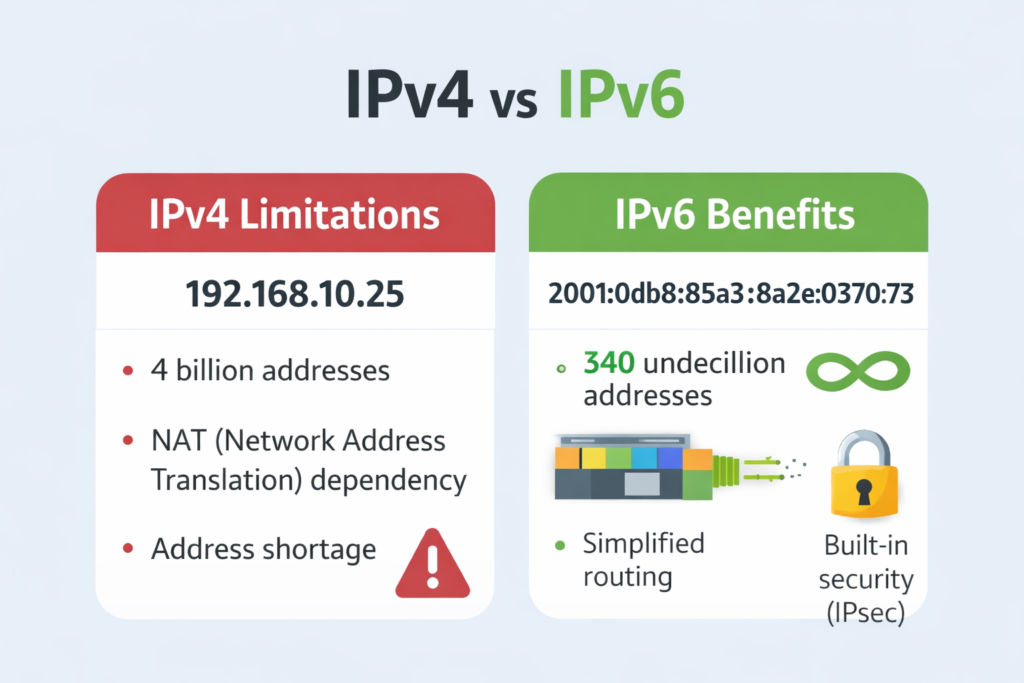
In addition to its larger address space, IPv6 improves network performance through a simplified packet header, more efficient routing, and the elimination of broadcast traffic, replacing it with multicast. It also incorporates support for security features such as IPsec and is designed to handle modern network demands more effectively.
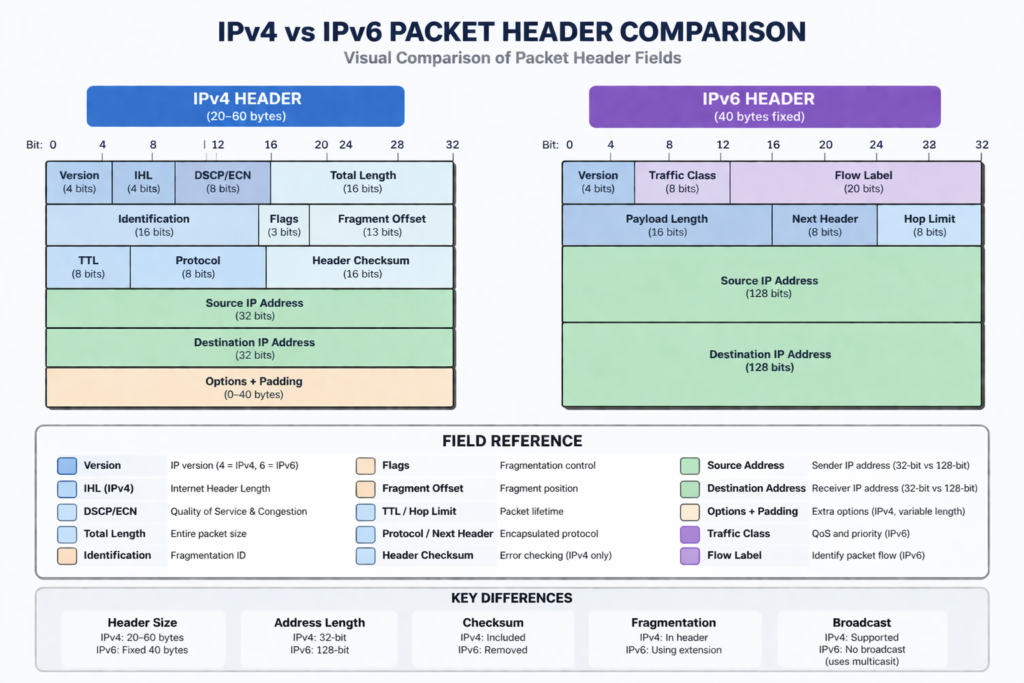
For network engineers, understanding IPv6 is critical. This includes recognizing its advantages over IPv4, learning how to configure IPv6 addressing, and verifying connectivity within a network environment.
IPv4 addressing was designed with a finite address space of approximately 4 billion unique addresses. With the rapid expansion of the internet, enterprise networks, mobile devices, and IoT systems, this pool became insufficient. To delay exhaustion and maximize efficiency, several techniques were introduced.
IPv4 Address Exhaustion Workarounds
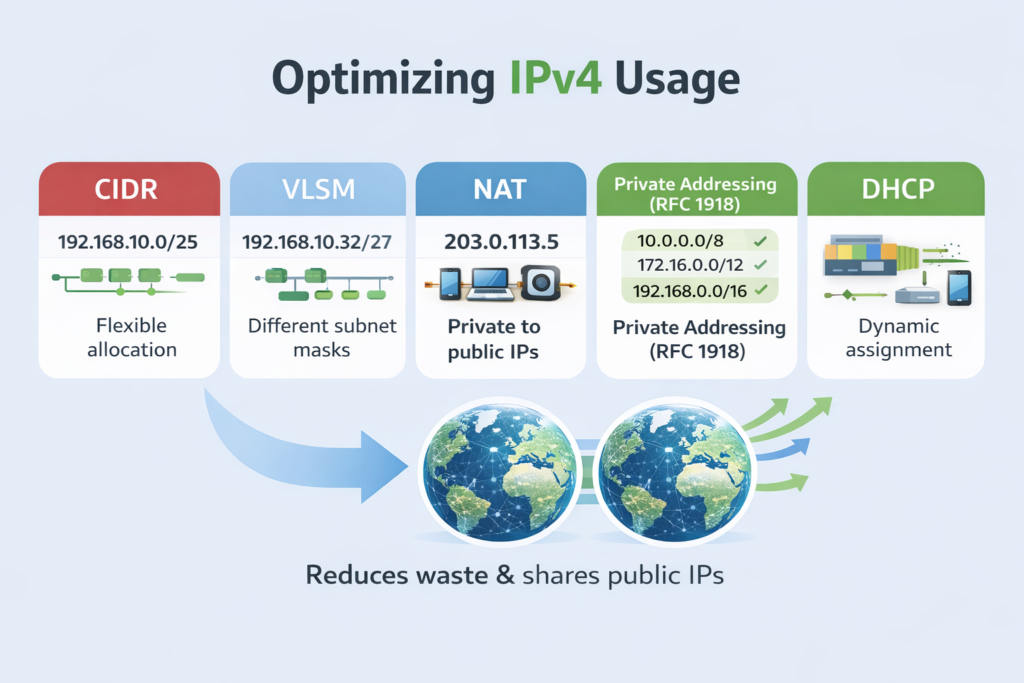
IPv4 address exhaustion workarounds are techniques used to conserve and extend the usability of the limited IPv4 address space. These include CIDR, VLSM, NAT, and private addressing defined in RFC 1918.
How It Works
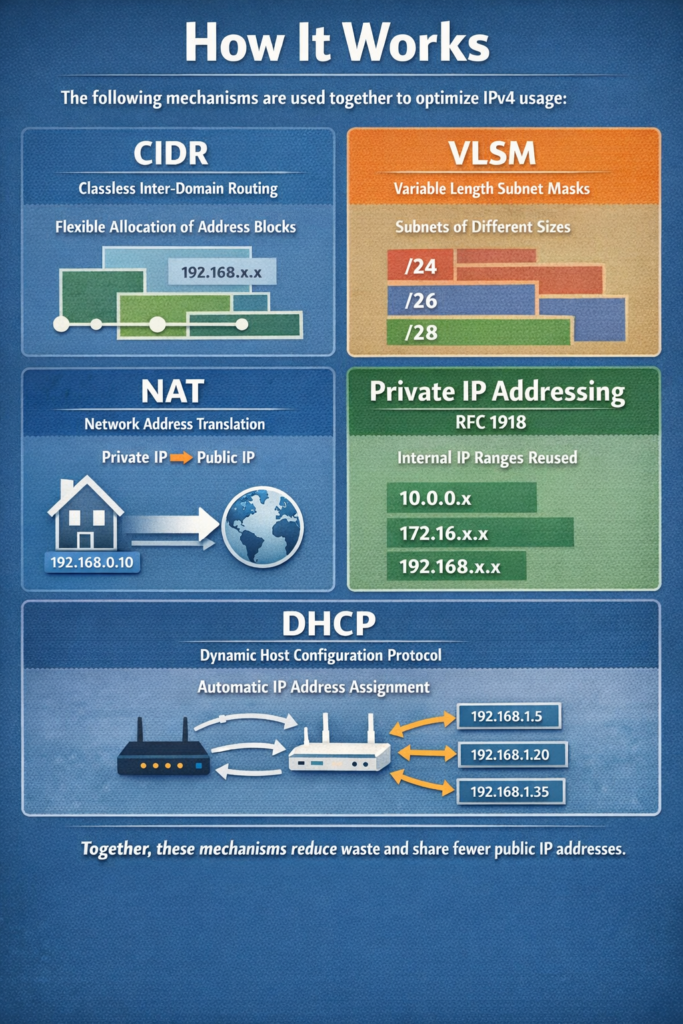
The following mechanisms are used together to optimize IPv4 usage:
- CIDR removes fixed class boundaries and allows flexible allocation of address blocks.
- VLSM allows subnet masks of different sizes within the same network.
- NAT translates private IP addresses into public IP addresses.
- Private addressing (RFC 1918) allows reuse of internal IP ranges across multiple organizations.
- DHCP dynamically assigns IP addresses to devices, reducing unused allocations.
These mechanisms collectively reduce waste and allow multiple devices to share fewer public IP addresses.
OSI Layer(s)
- Layer 3 (Network Layer): IP addressing, routing, NAT
- Layer 2 (Data Link Layer): Indirectly involved in local delivery
- Layer 7 (Application Layer): Affected when NAT interacts with applications
Protocols Involved
- IP (Internet Protocol): Provides logical addressing and routing
- DHCP (Dynamic Host Configuration Protocol): Automatically assigns IP addresses
- NAT (Network Address Translation): Translates private to public addresses
Relevant Cisco Commands
- ip route → Configures static routing
- ip nat inside → Defines internal interface for NAT
- ip nat outside → Defines external interface for NAT
- ip nat inside source list → Configures NAT translation rules
- interface → Used to assign IP addresses and roles
Real-World Examples
- Enterprise networks use private IP ranges (RFC 1918) internally and NAT to access the internet.
- ISPs use CIDR to allocate address blocks efficiently to customers.
- Data centers use VLSM to assign smaller subnets to point-to-point links and larger ones to server segments.
Basic Troubleshooting
- Verify IP addressing with “show ip interface brief”
- Check NAT translations using “show ip nat translations”
- Confirm subnet masks and routing tables
- Validate DHCP assignments with “show ip dhcp binding”
Important Points
- IPv4 address space is limited and requires optimization
- CIDR and VLSM improve address allocation efficiency
- NAT allows private networks to access the internet
- DHCP automates address assignment
Key Idea
IPv4 exhaustion is mitigated through techniques that optimize address allocation and reuse. CIDR, VLSM, NAT, and private addressing work together to extend IPv4 usability while supporting modern network growth.
CCNA Study Sheet
- Core concept summary: IPv4 conservation using CIDR, VLSM, NAT, and RFC 1918
- Key protocols involved: IP, DHCP, NAT
- OSI layer reference: Primarily Layer 3
- Commands to remember: ip nat, show ip nat translations, show ip route
- Key exam points: NAT types, CIDR notation, VLSM subnetting
CIDR (Classless Interdomain Routing)
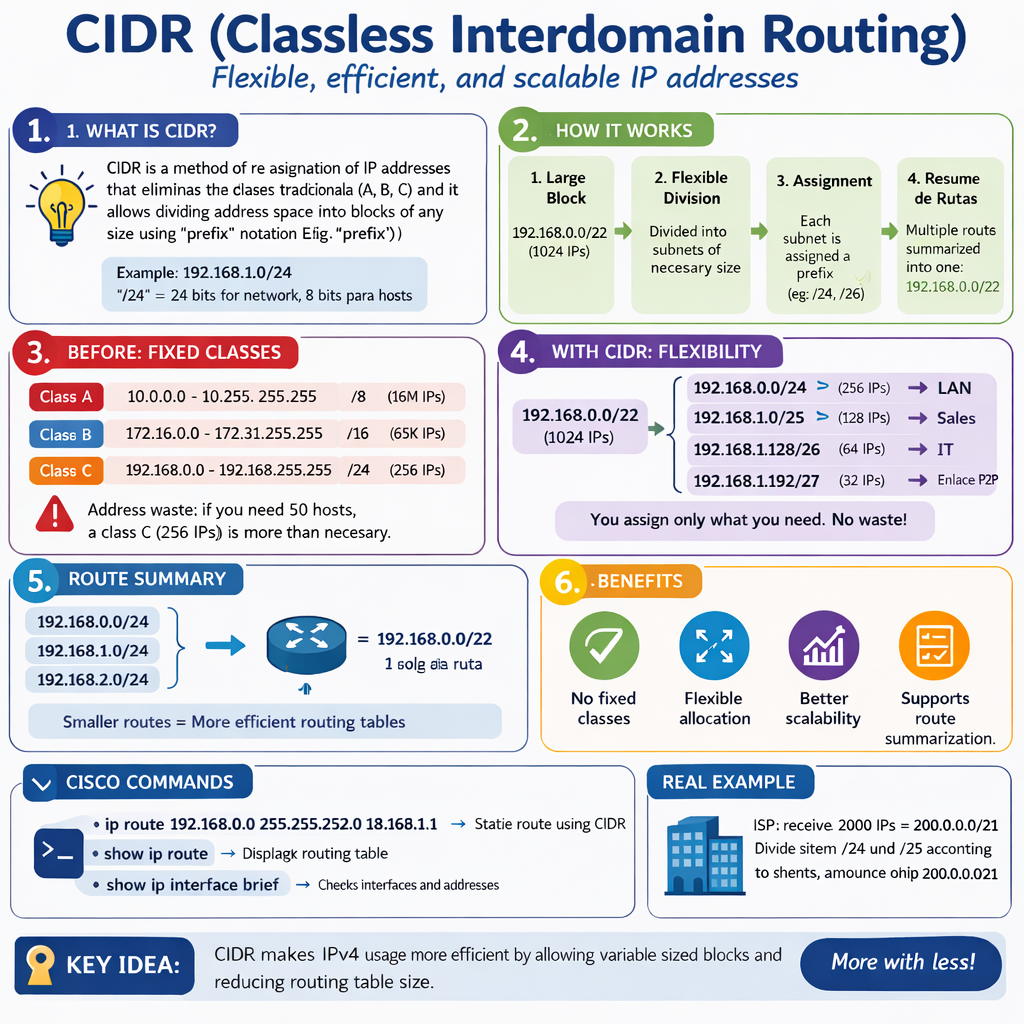
CIDR is a method of allocating IP addresses without using traditional class-based boundaries. It uses prefix length (e.g., /24) to define network size.
How It Works
- CIDR allows networks to be divided into blocks of varying sizes.
- Instead of fixed classes (A, B, C), networks are defined using prefix notation.
- Routing tables become smaller through route summarization.
OSI Layer(s)
- Layer 3 (Network Layer)
Protocols Involved
- IP
Relevant Cisco Commands
- ip route → Used for route summarization
- show ip route → Displays summarized routes
Real-World Examples
- ISPs allocate /20 or /22 blocks to customers instead of full class ranges
- Enterprises summarize multiple subnets into a single route
Basic Troubleshooting
- Check prefix length mismatches
- Validate route summarization
- Ensure correct subnet boundaries
Important Points
- Eliminates class-based addressing
- Uses prefix notation (/x)
- Supports route aggregation
- Improves routing scalability
Key Idea
CIDR enables flexible and efficient allocation of IP addresses while reducing routing table size through summarization.
CCNA Study Sheet
- Core concept: Classless addressing
- Protocol: IP
- OSI layer: Layer 3
- Commands: ip route, show ip route
- Exam focus: Prefix notation and summarization
VLSM (Variable-Length Subnet Masking)
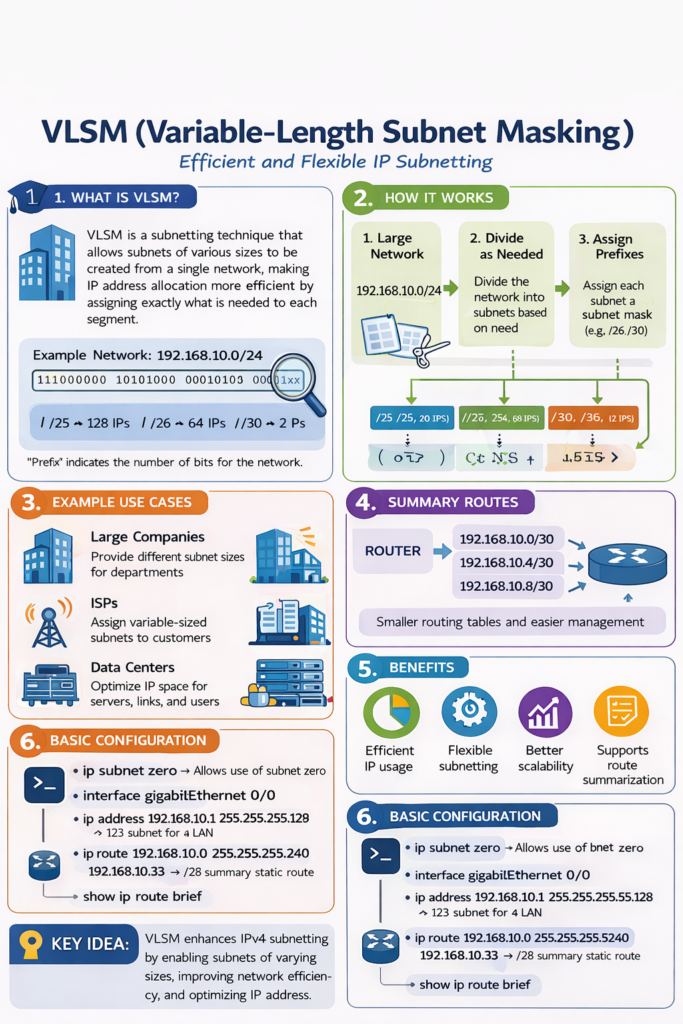
VLSM allows different subnet masks within the same network, enabling efficient allocation of IP addresses based on specific needs.
How It Works
- Subnets are created with different sizes depending on host requirements
- Smaller networks use shorter subnets (e.g., /30 for point-to-point)
- Larger networks use larger subnets (e.g., /24)
OSI Layer(s)
- Layer 3 (Network Layer)
Protocols Involved
- IP
Relevant Cisco Commands
- ip subnet-zero → Enables subnetting of subnet zero
- show ip route → Displays subnet routes
Real-World Examples
- WAN links use /30 subnets
- LAN segments use /24 or /25 subnets
Basic Troubleshooting
- Check incorrect subnet masks
- Verify overlapping subnets
- Validate IP assignments
Important Points
- Maximizes IP address utilization
- Allows multiple subnet sizes
- Requires careful planning
- Works with CIDR
Key Idea
VLSM allows networks to allocate IP addresses efficiently by tailoring subnet sizes to actual requirements.
CCNA Study Sheet
- Core concept: Flexible subnetting
- Protocol: IP
- OSI layer: Layer 3
- Commands: show ip route
- Exam focus: Subnet design
NAT (Network Address Translation)
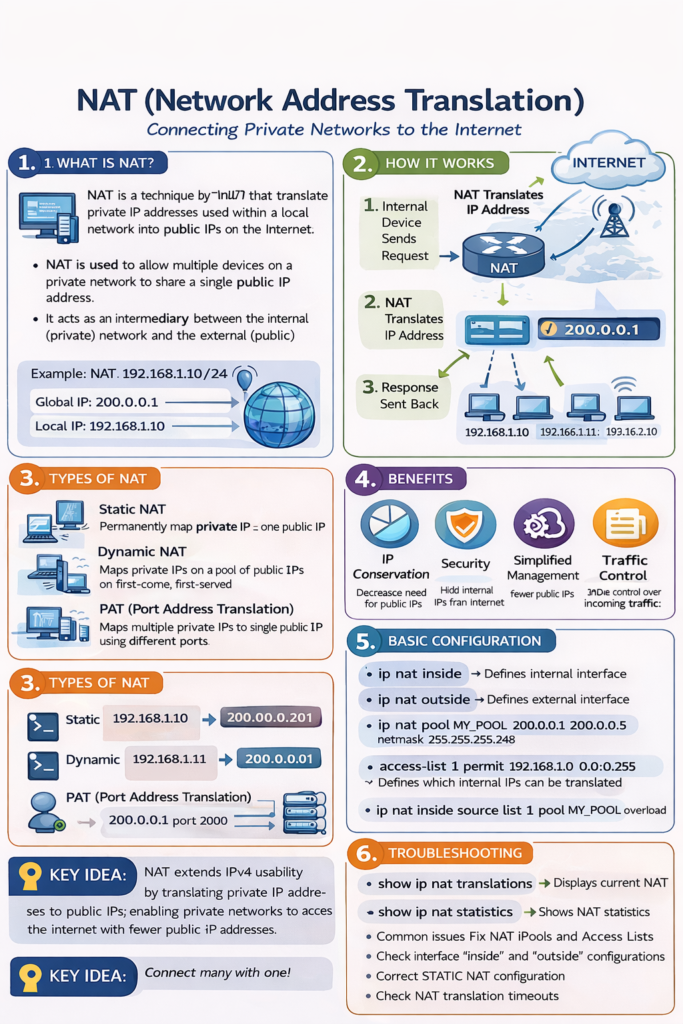
NAT is a process that translates private IP addresses into public IP addresses, enabling communication with external networks.
How It Works
- Internal devices use private IP addresses
- NAT device replaces source IP with a public IP
- Return traffic is translated back to the original private IP
Types (CCNA Concept)
- Static NAT: One-to-one mapping
- Dynamic NAT: Pool of public IPs
- PAT (Port Address Translation): Many-to-one mapping using ports
OSI Layer(s)
- Layer 3 (Network Layer)
- Layer 4 (Transport Layer) for PAT (ports)
Protocols Involved
- IP
- TCP/UDP (used in PAT for port translation)
Relevant Cisco Commands
- ip nat inside
- ip nat outside
- ip nat inside source static
- show ip nat translations
Real-World Examples
- Home routers translating multiple devices to one public IP
- Enterprises hiding internal networks behind firewalls
Basic Troubleshooting
- Check NAT table entries
- Verify inside/outside interface roles
- Confirm access control lists (ACLs) used in NAT
Important Points
- Enables multiple devices to share public IPs
- Breaks end-to-end communication model
- Required for IPv4 internet access
- Uses port numbers in PAT
Key Idea
NAT allows private networks to communicate externally by translating addresses, significantly extending IPv4 usability.
CCNA Study Sheet
- Core concept: Address translation
- Protocols: IP, TCP, UDP
- OSI layers: Layer 3 and 4
- Commands: ip nat, show ip nat translations
- Exam focus: NAT types and behavior
Private IPv4 Address Space (RFC 1918)
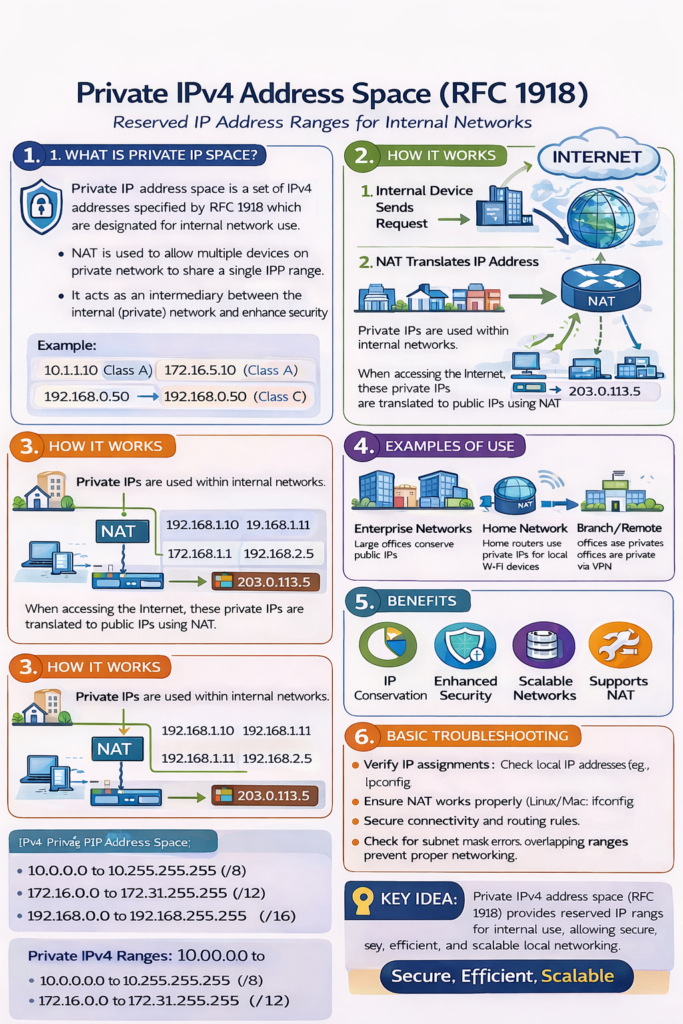
RFC 1918 defines private IP address ranges that are not routable on the public internet and are used within internal networks.
How It Works
Private ranges:
- 10.0.0.0/8
- 172.16.0.0/12
- 192.168.0.0/16
These addresses are reused across multiple organizations and require NAT for internet access.
OSI Layer(s)
- Layer 3 (Network Layer)
Protocols Involved
- IP
Relevant Cisco Commands
- ip address → Assigns private IPs to interfaces
Real-World Examples
- Corporate LANs use 10.0.0.0/8
- Home networks use 192.168.1.0/24
Basic Troubleshooting
- Check for duplicate IP addresses
- Verify NAT configuration for internet access
- Ensure proper subnetting
Important Points
- Not routable on the internet
- Used internally in networks
- Requires NAT for external communication
- Can be reused across organizations
Key Idea
Private IPv4 addresses enable internal communication within networks while conserving public IP space.
CCNA Study Sheet
- Core concept: Private addressing
- Protocol: IP
- OSI layer: Layer 3
- Commands: ip address
- Exam focus: RFC 1918 ranges
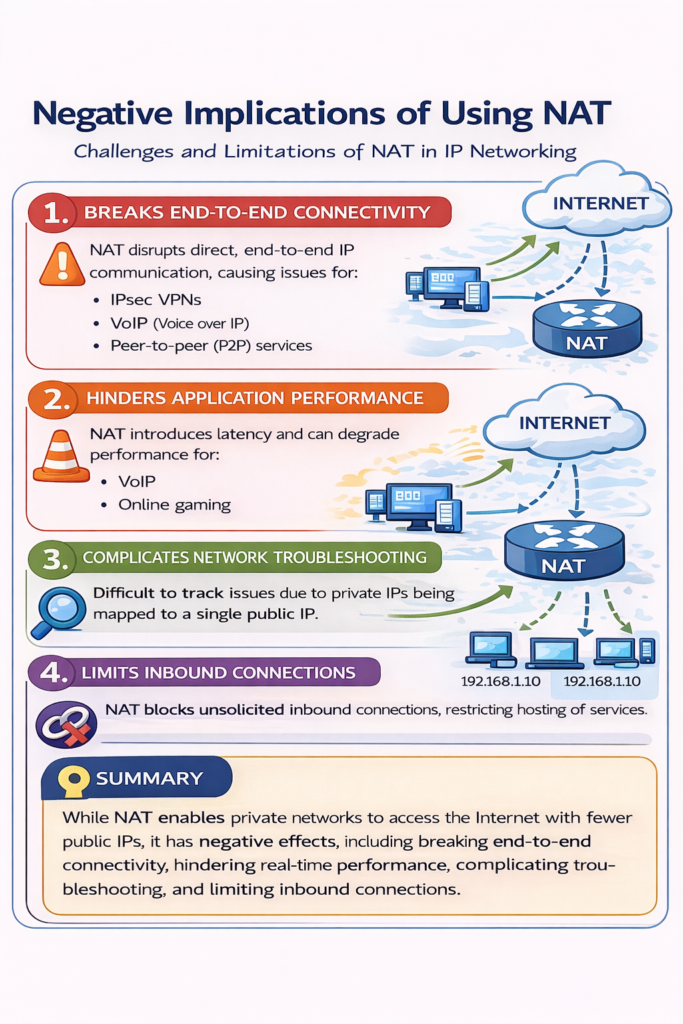
Negative Implications of Using NAT
NAT introduces limitations that affect network design, security, and application functionality.
How It Works
- NAT modifies packet headers during transmission
- This interferes with end-to-end communication and security mechanisms
OSI Layer(s)
- Layer 3 and Layer 4
Protocols Involved
- IP
- TCP/UDP
- IPsec (affected by NAT)
Relevant Cisco Commands
- show ip nat translations
- debug ip nat
Real-World Examples
- VPN failures due to NAT interference
- Peer-to-peer applications requiring NAT traversal
Basic Troubleshooting
- Check for NAT traversal issues
- Verify application compatibility
- Inspect packet headers
Important Points
- Breaks end-to-end model
- Interferes with security protocols
- Requires application awareness
- Causes address conflicts during network mergers
Key Idea
Although NAT extends IPv4 usability, it introduces complexity, breaks end-to-end communication, and creates challenges for security and application compatibility.
CCNA Study Sheet
- Core concept: NAT limitations
- Protocols: IP, TCP, UDP, IPsec
- OSI layers: Layer 3 and 4
- Commands: debug ip nat
- Exam focus: NAT drawbacks
Summary
IPv4 address exhaustion led to the development of multiple techniques to conserve address space and improve scalability. CIDR removed class-based limitations and enabled route summarization. VLSM allowed flexible subnetting to maximize efficiency. NAT enabled private networks to share public IP addresses, while RFC 1918 defined reusable private address ranges. DHCP further optimized address usage through dynamic allocation. Despite these improvements, NAT introduces limitations that affect security and application behavior. These challenges are key reasons why modern networks are transitioning to IPv6.
[Return to CCNA Study Hub] — Next Stop: [IPv6 Fundamentals: Features and Addressing Part II]