
Routing Defense
In modern enterprise networks, routing security is no longer optional. OSPF, while efficient and scalable, was not originally designed with strong security controls enabled by default. This makes OSPF authentication a critical component in protecting routing infrastructure from unauthorized access and malicious route injection.
This article focuses exclusively on OSPF authentication mechanisms, specifically MD5 (Message Digest 5) and SHA (Secure Hash Algorithm), how they work, and how to implement them effectively.
The Role of OSPF Authentication
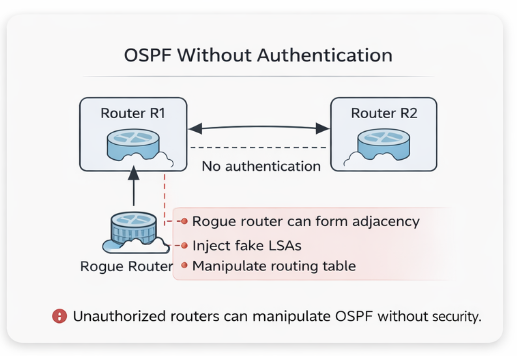
OSPF routers exchange routing information dynamically. Without authentication, any device capable of sending OSPF packets could:
- Form neighbor relationships
- Inject false routes
- Disrupt network topology
- Cause traffic blackholing or redirection
Authentication ensures that only trusted routers participate in OSPF communication.
Types of OSPF Authentication
OSPF supports three main authentication types:
- Null Authentication (Type 0)
- No authentication
- Default behavior (not secure)
- Not recommended
- Simple Password Authentication (Type 1)
- Plain-text password
- Easily readable in packet captures
- Not recommended
- Cryptographic Authentication (Type 2)
- Uses hashing (MD5 or SHA)
- Secure and widely used
MD5
How MD5 Works
Message Digest 5 or (MD5) authentication protects OSPF packets by generating a hash value using:
- The OSPF packet content
- A shared secret key
The receiving router performs the same hash calculation and compares results. If the hashes match, the packet is accepted.
Key Characteristics
- Uses a shared key (password)
- Supports multiple keys (key-chain concept)
- Includes a sequence number to prevent replay attacks
- Widely supported across vendors
Example Configuration (Cisco)
interface GigabitEthernet0/0
 ip ospf authentication message-digest
 ip ospf message-digest-key 1 md5 MySecureKey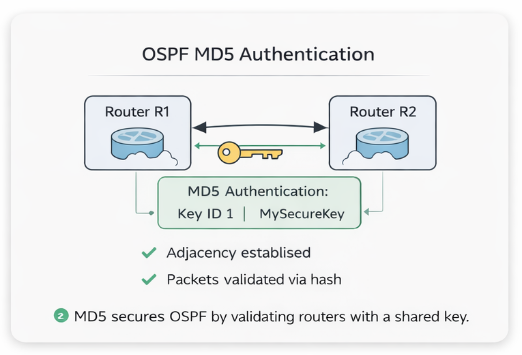
Or at the area level:
router ospf 1
 area 0 authentication message-digest
Verification Commands
show ip ospf interface
show ip ospf neighbor
SHA
MD5 is considered cryptographically weak by modern standards. While still commonly used in networking, organizations with strict security requirements prefer stronger algorithms like SHA.
OSPFv2 traditionally uses MD5, but newer implementations (especially with OSPFv3 or vendor enhancements) support SHA-based authentication.
How SHA Authentication Works
Secure Hash Algorithm or (SHA) authentication follows a similar process to MD5:
- A hash is generated using the packet and shared key
- The receiving router validates the hash
- Ensures integrity and authenticity
However, SHA provides:
- Stronger hashing (e.g., SHA-1, SHA-256)
- Better resistance to collision attacks
Example Configuration (Cisco with Key Chain)
key chain OSPF_KEYS
 key 1
  key-string MyStrongKey
  cryptographic-algorithm hmac-sha-256

interface GigabitEthernet0/0
 ip ospf authentication key-chain OSPF_KEYS
MD5 vs SHA
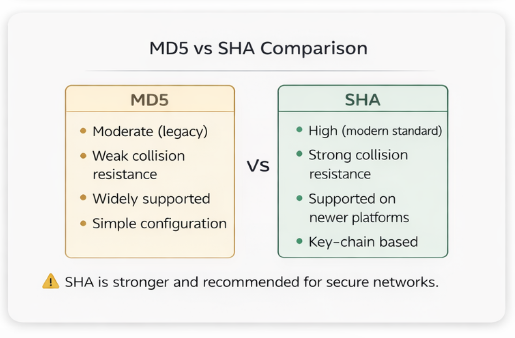
| Feature | MD5 | SHA |
|---|---|---|
| Security Level | Moderate (legacy) | High (modern standard) |
| Collision Resistance | Weak | Strong |
| Support | Universal | Newer platforms |
| Configuration | Simple | Requires key chains |
| Use Case | Legacy environments | Secure enterprise networks |
Key Chain Concept (Important for SHA)
Unlike basic MD5 configuration, SHA commonly uses key chains, which provide:
- Multiple keys with different IDs
- Key rotation capability
- Lifetime control (start/end time)
Benefits:
- Seamless key updates without downtime
- Better compliance with security policies
- Reduced risk of key compromise
Common Misconfigurations
From a troubleshooting standpoint, OSPF authentication issues are very predictable:
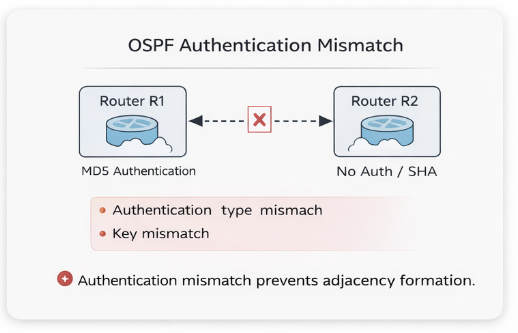
1. Authentication Mismatch
- One side uses MD5, the other uses SHA or none
- Result: Neighbor adjacency fails
2. Key Mismatch
- Incorrect password or key ID
- Result: OSPF packets rejected
3. Area vs Interface Configuration Conflict
- Authentication enabled at area level but missing on interface
- Result: Inconsistent behavior
4. Key Chain Timing Issues (SHA)
- Key not yet valid or expired
- Result: Intermittent adjacency drops
Troubleshooting Commands
debug ip ospf adj
debug ip ospf packet
show ip ospf interface
show key chain
Look for:
- Authentication type mismatches
- Key ID inconsistencies
- Sequence number issues
Best Practices
To ensure secure and stable OSPF authentication:
- Use SHA (HMAC-SHA-256 or better) whenever supported
- Avoid plain-text authentication completely
- Implement key chains for scalability and rotation
- Standardize authentication across the entire OSPF domain
- Document key IDs and lifetimes
- Regularly audit configurations
When to Use MD5 vs SHA
Use MD5 if:
- Working with legacy hardware
- Compatibility is required across older devices
Use SHA if:
- Security compliance is required (e.g., NIST, ISO)
- Operating in enterprise or critical infrastructure environments
- Devices support modern cryptographic standards
Conclusion
OSPF authentication is one of the simplest yet most impactful security measures you can implement in a routing environment. While MD5 has been the traditional choice, transitioning to SHA-based authentication is the logical next step for modern networks.
In real-world operations, authentication misconfigurations are a common root cause of OSPF adjacency failures, understanding both the theory and implementation is essential for any network engineer.
Say hi or ask a question: fromzerotoccna@gmail.com