
Request Routing
Routing is one of the core functions of an IP network. It allows devices in different networks to communicate by using routers to make forwarding decisions. In CCNA-level networking, routing explains how a router identifies a destination network, chooses the best available path, and forwards packets through the correct interface.
In this section: Routing Fundamentals, you will learn how routers use routing tables, how routes are learned, how directly connected and remote networks are handled, and how static routes and dynamic (IPv4 and IPv6) routing protocols help routers reach networks that are not directly connected.
Routing
Definition
- Routing is the Layer 3 process of selecting the best path to forward packets from one IP network to another.
- A router is a network device that connects different networks and forwards packets based on destination IP addresses.
- A route is an entry that tells the router how to reach a specific destination network.
- A routing table is the database a router uses to decide where to send packets.
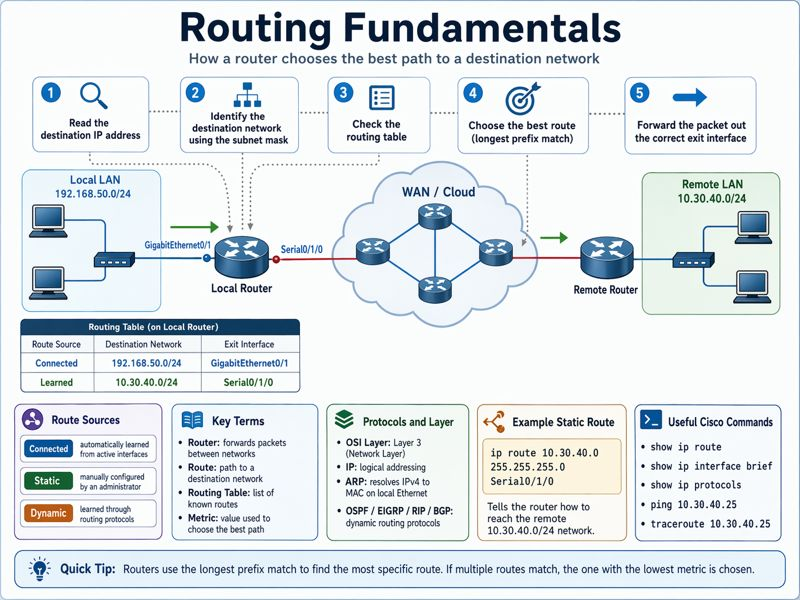
In this example, the router has two known routes:
- The network 192.168.50.0/24 is directly connected through interface GigabitEthernet0/1.
- The network 10.30.40.0/24 was learned through another router and is reachable through interface Serial0/1/0.
How It Works
When a router receives a packet, it performs a routing decision.
- The router checks the destination IP address of the packet.
- It applies the subnet mask to identify the destination network.
- It searches the routing table for the best matching route.
- It selects the exit interface or next-hop router.
- It forwards the packet out the selected interface.
- If no matching route exists and no default route is configured, the packet is dropped.
For example, if a packet is going to 10.30.40.0/24, the router checks its routing table and sees that this network is reachable through Serial0/1/0. The router then forwards the packet out that interface.
Routing Information and the Routing Table
Definition
Routing information is the data a router uses to build and maintain its routing table. A routing table contains entries for known networks. Each entry usually includes:
- Destination network
- Subnet mask or prefix length
- Next-hop IP address, if required
- Exit interface
- Route source*
- Metric or path cost
The route source* identifies how the router learned the route.
Common route sources include:
- Connected routes (neigh-boards)
- Static routes
- Dynamic routing protocols
How It Works
- A router can learn routes in different ways.
- A connected route is automatically added when a router interface has an IP address and is active.
- A static route is manually configured by an administrator.
- A dynamic route is learned automatically from another router through a routing protocol.
The router compares available routes and installs the best route into the routing table. If multiple routes exist for the same destination, the router uses administrative distance and metric to choose the preferred path.
- Administrative distance is a Cisco value used to rank the trustworthiness of a route source.
- Metric is a value used by a routing protocol to select the best path.
Router Routing Actions
Identify the Destination of the Packet
- The router reads the destination IP address in the packet header.
- The subnet mask or prefix length helps determine the destination network.
Example:
Destination IP: 10.30.40.25
Subnet mask: 255.255.255.0
Destination network: 10.30.40.0/24
Identify Sources of Routing Information
The router determines how routes can be learned.
Possible sources include:
- Directly connected interfaces
- Manually configured static routes
- Dynamic routing protocols such as OSPF, EIGRP, RIP, or BGP
Identify Routes
The router builds a list of known paths to destination networks.
Each route tells the router either:
- Which local interface to use
- Which next-hop router to send the packet to
Select Routes
The router selects the best route based on the routing table. The most specific match is preferred. This is called longest prefix match.
Example:
If the routing table has both routes below:
- 10.30.0.0/16
- 10.30.40.0/24
A packet going to 10.30.40.25 will use 10.30.40.0/24 because it is more specific.
Maintain and Verify Routing Information
- Routers must keep routing information accurate.
- Dynamic routing protocols update the routing table when network conditions change.
- Administrators verify routing by checking the routing table, testing connectivity, and confirming interface status.
Directly Connected and Remote Networks
Definition
- A directly connected network is a network assigned to one of the router’s active interfaces.
- A remote network is a network that is not directly connected to the router and must be reached through another router.
How It Works
If the destination network is directly connected, the router already knows which interface to use.
Example:
If GigabitEthernet0/1 is configured with an IP address in the 192.168.50.0/24 network, the router automatically adds that network to the routing table.
If the destination network is not directly connected, the router must learn a route to that network.
Example:
The router does not have an interface in the 10.30.40.0/24 network. Therefore, it must use a learned route through Serial0/1/0.
Static and Dynamic Routes
Definition
- A static route is a route manually configured by a network administrator.
- A dynamic route is a route learned automatically through a routing protocol.
How It Works
Static: With static routing, the administrator manually tells the router how to reach a remote network.
Example Cisco command:
ip route 10.30.40.0 255.255.255.0 Serial0/1/0
This command tells the router to reach 10.30.40.0/24 by forwarding traffic out Serial0/1/0.
Dynamic: With dynamic routing, routers exchange routing information automatically.
Examples of dynamic routing protocols:
- OSPF: Link-state routing protocol commonly used in enterprise and campus networks.
- EIGRP: Cisco advanced distance-vector routing protocol.
- RIP: Older distance-vector routing protocol that uses hop count as its metric.
- BGP: Path-vector routing protocol used mostly between ISPs and large organizations.
Student Note:
At this point, do not worry about understanding OSPF, EIGRP, RIP, or BGP in detail. For now, it is enough to know that these are dynamic routing protocols, which means routers can use them to learn network routes automatically.

We will study each protocol later in more detail, including how they work, where they are used, and how they appear in Cisco routing tables. For this section, focus on the basic idea that routers can learn remote networks either manually through static routes or automatically through dynamic routing protocols.
OSI Layer(s)
- Routing primarily operates at Layer 3, the Network Layer.
- Layer 3 is responsible for logical addressing and path selection using IP addresses.
- Layer 2, the Data Link Layer, is also involved when the router forwards the packet out an interface. Before sending the packet on an Ethernet link, the router must use a Layer 2 frame with the correct destination MAC address.
Relevant OSI layers:
- Layer 3: IP addressing, routing decisions, routing table lookup
- Layer 2: Frame forwarding on the local link
- Layer 1: Physical transmission over cables, fiber, or wireless media
Protocols Involved
- IP: Provides logical addressing and allows packets to move between networks.
- ARP: Resolves an IPv4 address to a MAC address on Ethernet networks.
- ICMP: Used by tools such as ping and traceroute to test connectivity.
- OSPF: Dynamically learns and advertises routes inside an organization.
- EIGRP: Cisco routing protocol used to dynamically exchange routes.
- RIP: Simple routing protocol that uses hop count as its metric.
- BGP: Routing protocol used between autonomous systems, commonly on the internet.
Relevant Cisco Commands
show ip route| Displays the IPv4 routing table.show ip interface brief| Shows interface status and assigned IP addresses.show running-config| Displays the active configuration, including static routes and routing protocols.ip route <destination-network> <subnet-mask> <next-hop-or-exit-interface>| Creates a static route.
Example:
ip route 10.30.40.0 255.255.255.0 Serial0/1/0
show ip protocols| Displays information about active dynamic routing protocols.ping <destination-ip> |Tests basic IP connectivity.
Example:
ping 10.30.40.25
traceroute <destination-ip>| Shows the path packets take to reach a destination.
Example:
traceroute 10.30.40.25
Real-World Examples
- In an enterprise network, routers connect departments such as Accounting, Operations, and IT when each department uses a different subnet.
- In a campus network, routers or Layer 3 switches route traffic between VLANs, buildings, and distribution blocks.
- In a data center, routing is used between server networks, storage networks, firewall zones, and internet edge routers.
- In an ISP network, routers use dynamic routing protocols such as BGP to exchange routes with other providers and large customers.
- In a branch office, a static default route may point all internet-bound traffic to the headquarters firewall or WAN router.
Basic Troubleshooting
Common routing issues include:
- Missing route in the routing table
- Incorrect subnet mask
- Interface is administratively down
- Wrong next-hop IP address
- Routing protocol not enabled on the correct interface
- Access control list blocking traffic
- No return route from the destination network
Useful troubleshooting steps:
- Check interface status with
show ip interface brief. - Verify the routing table with
show ip route. - Test local gateway reachability with
ping. - Trace the packet path with
traceroute. - Confirm static route configuration with
show running-config. - Verify routing protocol operation with
show ip protocols.
Important Points
- Routing allows packets to move between different IP networks.
- Routers use routing tables to select the best forwarding path.
- Directly connected routes are learned automatically from active router interfaces.
- Remote networks must be learned through static routes or dynamic routing protocols.
- The most specific route match is preferred.
- If no specific route matches the destination, the router uses the default route if one exists. If there is no specific route and no default route, the router drops the packet. IMPORTANT: A router drops a packet only when no route matches the destination. A configured default route (0.0.0.0/0) matches all IPv4 destinations, so it prevents the packet from being dropped unless the default route itself is invalid, unreachable, or removed from the routing table.
- Routing is a Layer 3 function, but Layer 2 is required for local frame forwarding.
Key Idea
Routing is the process a router uses to forward packets toward remote networks. The router checks the destination IP address, searches the routing table, selects the best route, and forwards the packet through the correct exit interface or next-hop router.
CCNA Study Sheet
- Core concept summary: Routing allows communication between different IP networks by using routers and routing tables.
- Key protocols involved: IP, ARP, ICMP, OSPF, EIGRP, RIP, BGP.
- OSI layer reference: Routing operates mainly at Layer 3. Layer 2 is used for local frame delivery.
- Commands to remember:
show ip route,show ip interface brief,ip route,ping,traceroute,show ip protocols. - Key exam points: Know the difference between connected, static, and dynamic routes. Understand longest prefix match. Understand that routers drop packets when no route exists. Know how to verify routing table entries.
Summary
Routing is a fundamental Layer 3 function that allows packets to move between different IP networks. A router makes forwarding decisions by reading the destination IP address, identifying the destination network, and searching the routing table for the best match.
Routing tables contain connected, static, and dynamic routes. Connected routes are created automatically when router interfaces are active and configured with IP addresses. Static routes are manually configured by administrators. Dynamic routes are learned through routing protocols such as OSPF, EIGRP, RIP, or BGP.
A router forwards packets using the best available route. If the destination network is directly connected, the router sends the packet out the local interface. If the destination network is remote, the router forwards the packet to a next-hop router or out a specified exit interface. If no route is available, the packet is dropped.
For CCNA preparation, it is important to understand how routing tables work, how routers select routes, how static and dynamic routes differ, and how to verify routing using Cisco IOS commands such as show ip route, ping, and traceroute.
[Return to CCNA Study Hub] — Next Stop: [Routing Fundamentals | Part II – Static Vs. Dynamic] …Available Soon!