
Universal troubleshooting loop
Troubleshooting in networking is a controlled reduction of possibilities. You are not trying commands. You are building evidence, eliminating entire categories of failure, and converging on the smallest possible fault domain.
At any moment, you should be able to answer:
- What is the current scope (who… what… where…)?
- What have I proven works (and therefore can be deprioritized)?
- What is the next test and what will it eliminate?
Every structured method uses the same loop; methods differ only in where you start and how you traverse.
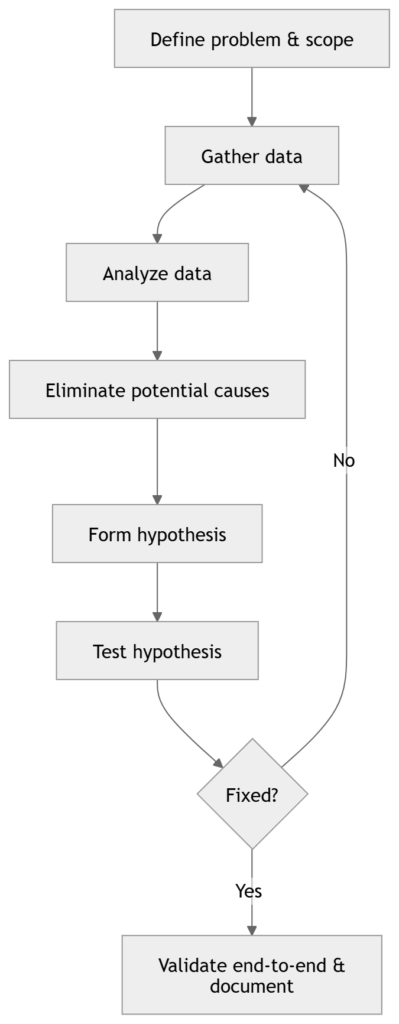
What define the problem really means
Lock down scope immediately:
- Impact: single host, subnet/VLAN, site, WAN, global
- Symptom type:
- No connectivity (hard down)
- Intermittent (flaps, drops, timeouts)
- Performance (latency, loss, throughput)
- Reachability vs name resolution vs application
- Reproducibility: consistent, time-based, load-based
- Recent change: config change, code upgrade, cabling, circuit, policy push
This prevents wasting time on irrelevant layers or devices.
Map tests to OSI layers
When you run a test, know what layer(s) it validates.
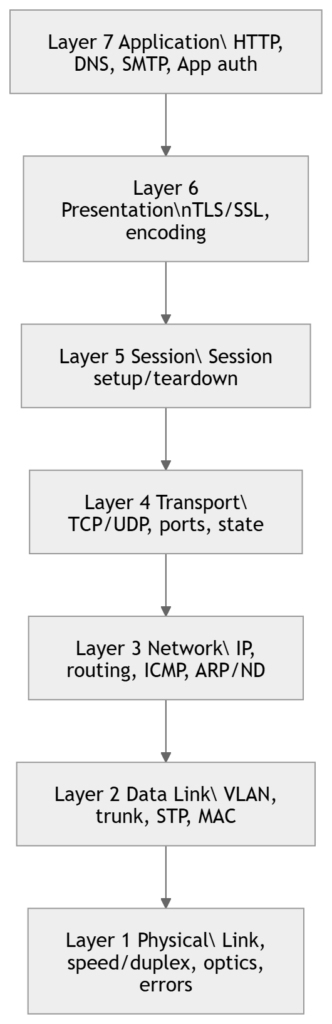
Key engineering point: A successful test does not prove everything is fine. It proves this specific thing worked under these conditions. For example, a ping can succeed while TCP 443 fails due to ACL/policy; a TCP handshake can succeed while large transfers fail due to MTU/PMTUD issues.
Structured troubleshooting
1) Top-Down (start at L7, go down)
When to use
- User reports an application symptom (web app, email, DNS name fails, authentication fails)
- Multiple lower-layer checks already show clean (links up, routing stable)
- You suspect DNS, proxy, TLS, app policy, server-side, or L4 policy
How it narrows the scope
You attempt to prove whether the issue is above L4, then drop down only if needed.
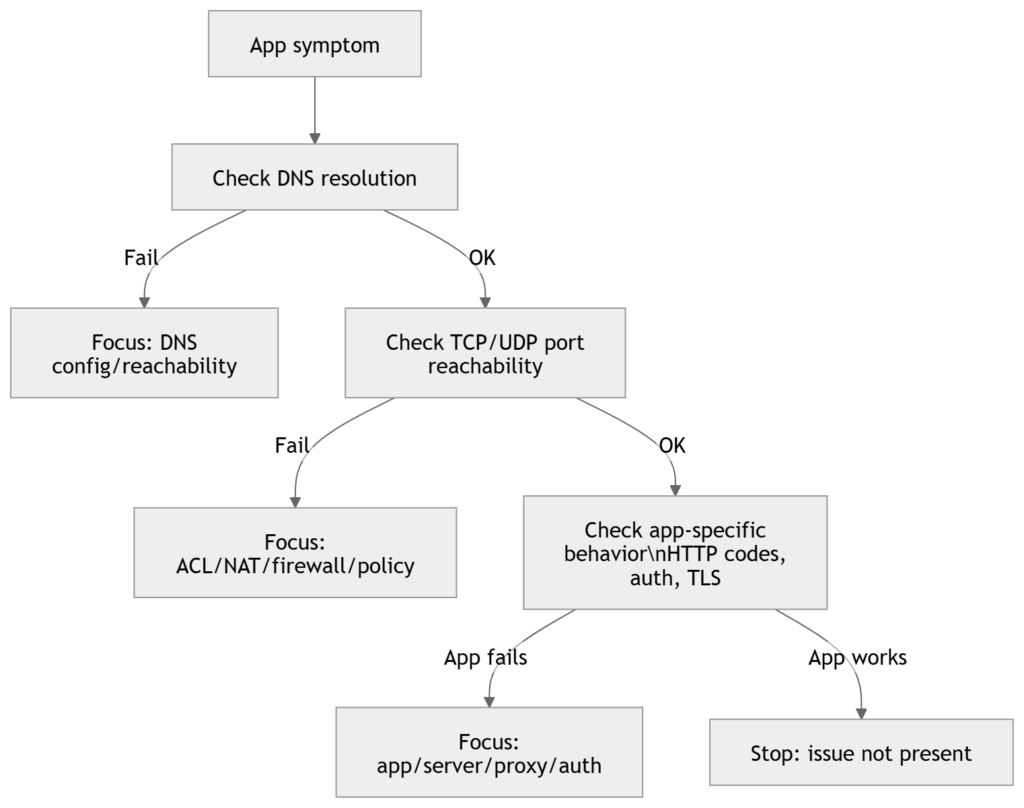
Typical command set (Cisco + generic)
On endpoint (conceptually):
- Resolve name to IP (DNS)
- Confirm port reachability (TCP/UDP)
- Confirm application response (HTTP status, TLS errors)
On network devices:
ping <server-ip>
traceroute <server-ip>
show ip route <server-ip>
show access-lists
show ip nat translations
show logging
What top-down eliminates quickly
- If you can establish a clean L4 session to the correct destination, your focus shifts to:
- DNS (if name-based)
- TLS/certs
- proxy behavior
- server/app health
- authentication/authorization
2) Bottom-Up (start at L1, go up)
When to use
- Link down/flapping
- Errors/discards increasing
- Speed/duplex mismatch suspicion
- New cabling/patching/optic work
- Slow network reports with no clear app boundary
Method logic
You validate each layer in order, eliminating entire categories systematically.
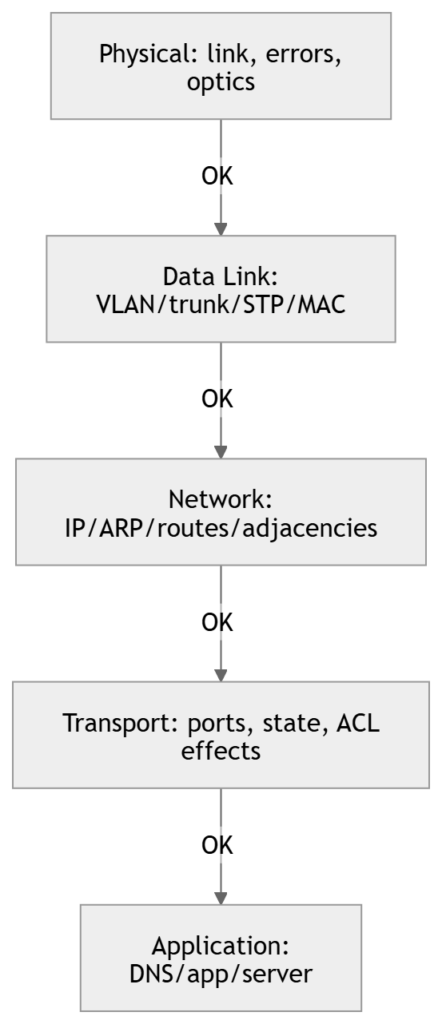
Cisco-focused workflow and commands
L1: Physical
show interfaces status
show interfaces <int>
show interfaces counters errors
show logging | include <int>
What you’re looking for:
- link up/down transitions
- CRC, input errors, frame errors
- late collisions (legacy)
- drops/discards (can be congestion or policy depending on platform)
L2: Switching (VLAN/trunk/STP/MAC)
show vlan brief
show interfaces trunk
show spanning-tree interface <int>
show mac address-table dynamic interface <int>
show etherchannel summary
What you’re proving:
- correct VLAN membership (access port)
- correct allowed VLANs + native VLAN (trunk)
- STP not blocking unexpectedly
- MAC learning happening where expected
L3: IP/routing
show ip interface brief
show ip arp
show ip route
ping <gateway>
ping <remote-ip>
traceroute <remote-ip>
show ip cef <remote-ip>
What you’re proving:
- correct addressing and gateway
- ARP resolution to next hop
- route exists and forwarding decision is correct
L4+: policy edges (ACL/NAT/QoS)
show access-lists
show ip nat translations
show policy-map interface <int>
3) Divide-and-Conquer (start at L3, then go up or down)
When to use
- Unclear whether it’s network vs application
- Need quick isolation with minimal data
- Best “first move” in many enterprise incidents
Core approach
Start with an L3 test (often ICMP). Pivot based on result.
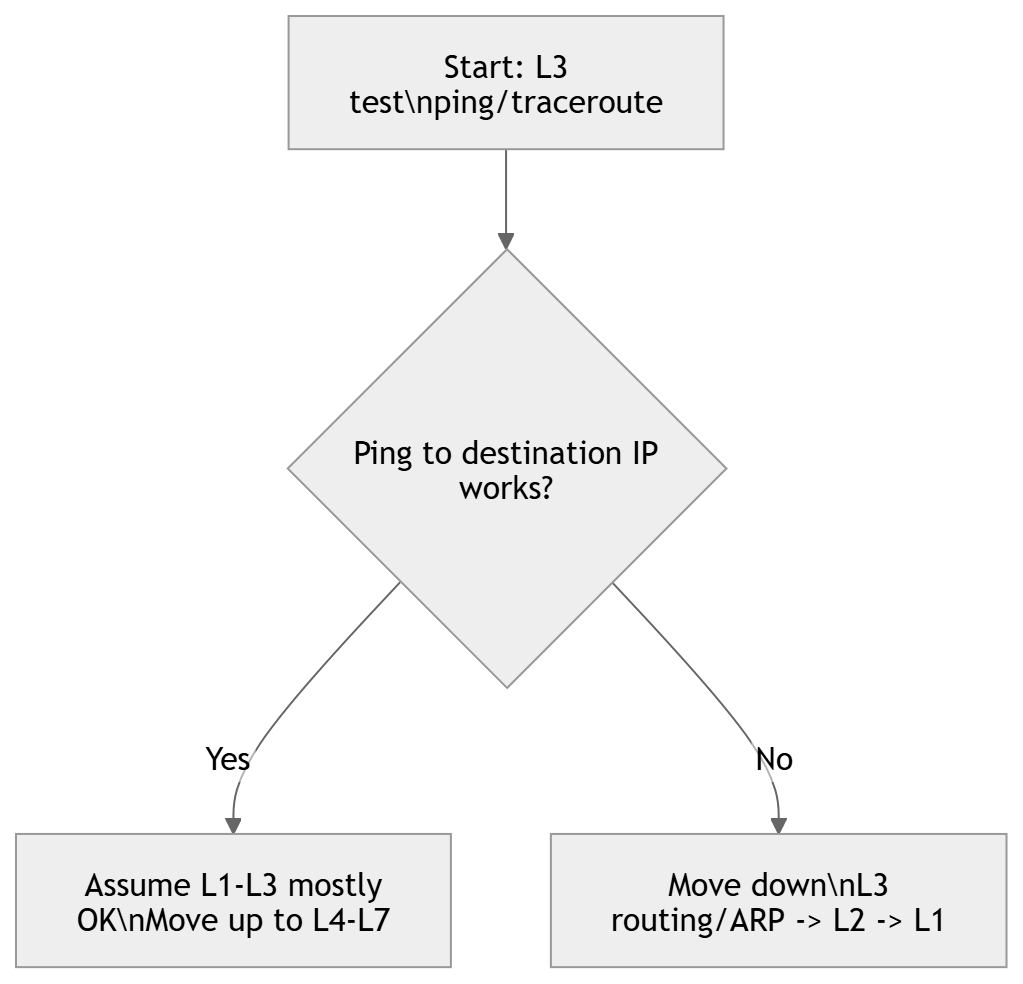
Practical detail (important)
- If ping fails, try staged pings:
- ping default gateway
- ping next hop / distribution SVI
- ping WAN edge / remote loopback
- A single failed ping does not equal “routing broken”:
- ICMP may be filtered
- asymmetric path may drop return traffic
- VRF mismatch
- policy routing / firewall state
4) Follow-the-Path (hop-by-hop)
When to use
- Multi-hop problems (campus + WAN + DC)
- Specific source-to-destination issues
- Asymmetric routing suspected
- Intermittent drops that correlate to a segment
Steps
- Identify expected forwarding path (routing table, design, traceroute)
- Verify each hop:
- interface health
- L2 adjacency where relevant
- L3 forwarding and next hop
- policy (ACL/QoS/NAT/firewall)

Commands
traceroute <dst-ip>
show ip route <dst-ip>
show interfaces <int>
show access-lists
show ip nat translations
show cdp neighbors detail
show lldp neighbors detail
5) Swap Components (substitution isolation)
When to use
- Suspected hardware/PHY faults with limited telemetry
- Edge issues: one user, one port, one optic
- Need rapid isolation
What to swap (controlled)
- patch cable
- switch port
- SFP/optic
- NIC (or test with another adapter)
- move endpoint to a known-good location
Rules
- Swap one variable at a time
- Document what you changed (port IDs, serials, timestamps)
- Validate with the original failing test
6) Perform Comparison (working vs broken)
When to use
- Standardized design repeated across sites
- Templates exist (intended state)
- “This one VLAN/site is failing but others work”
What to compare
- interface config (access/trunk, portfast, bpduguard)
- VLAN presence and allowed list
- SVI config and ACLs
- routing adjacency and advertised routes
- software versions, feature flags
Commands:
show run interface <int>
show run | section <feature>
show vlan brief
show interfaces trunk
show ip route
show version
Practical runbook starter
If you only remember one operational sequence for incident start, use this:
- Scope: who/what/where + last change
- Divide-and-conquer: ping/traceroute to determine direction
- If path-related: follow-the-path
- If edge-related: bottom-up + swap
- If app-specific: top-down
- Compare against baseline if you have a known-good
CLI quick sets to memorize
L1
show interfaces status
show interfaces <int>
show interfaces counters errors
L2
show vlan brief
show interfaces trunk
show spanning-tree
show mac address-table
L3
show ip interface brief
show ip arp
show ip route
ping <ip>
traceroute <ip>
Policy/edge
show access-lists
show ip nat translations
show logging
Exam tips
- If the prompt is “application not working,” the expected answer is often Top-Down.
- If you see CRC, link flaps, duplex/speed, err-disable, that points to Bottom-Up.
- If you see “fastest way to isolate,” Divide-and-Conquer is frequently correct.
- If multiple routers/switches are shown and you must isolate along a route, pick Follow-the-Path.
- If the scenario says “compare to a working site/port,” choose Perform Comparison.
- If the scenario says “replace cable/port/NIC to see if it follows,” choose Swap Components.
Summary
- All troubleshooting uses the same loop: define → gather → analyze → eliminate → hypothesize → test → validate/document.
- Methods differ by traversal strategy:
- Top-Down: L7 → L1 (best for app/DNS/auth/proxy symptoms)
- Bottom-Up: L1 → L7 (best for physical/L2 faults and disciplined validation)
- Divide-and-Conquer: start at L3, pivot (fastest general-purpose isolator)
- Follow-the-Path: hop-by-hop path validation (best for multi-hop/WAN/path issues)
- Swap: substitution isolation (best for hardware/edge)
- Comparison: baseline vs broken deltas (best for templated networks)
[Return to CCNA Study Hub] — Next Stop: [Section 3 | Media and Port Issues] …Available Soon!