
LAB OBJECTIVES
By completing this lab, the student will be able to:
- Identify Ethernet duplex mismatch symptoms using Cisco IOS show commands
- Verify and correct IPv4 addressing errors on routers and end devices
- Test local and remote connectivity using ICMP and traceroute
- Interpret interface statistics such as CRC errors, collisions, and drops
- Apply a structured CCNA troubleshooting process to Layer 1, Layer 2, and Layer 3 issues
Packet Tracer Lab (link) https://drive.google.com/file/d/12NK0xyrDUzcNt52UlKutXNLj9X_NOyus/view?usp=sharing
DEVICE DETAILS
| Device | Role |
| R1 | Branch Router |
| R2 | Edge Router |
| ACCESS-SW1 | Access Switch for User VLAN |
| ACCESS-SW2 | Access Switch for Server VLAN |
| Host-A | User PC |
| Host-B | Server PC |
| Admin | Management laptop |
NETWORK TOPOLOGY
| Device A | Interface | Device B | Interface |
|---|---|---|---|
| Host-A | NIC | ACCESS-SW1 | F0/6 |
| Admin-PC | NIC | ACCESS-SW1 | F0/18 |
| ACCESS-SW1 | G0/1 | R1 | G0/0 |
| R1 | G0/1 | R2 | G0/0 |
| R2 | G0/1 | ACCESS-SW2 | G0/1 |
| ACCESS-SW2 | F0/10 | Host-B | NIC |
TOPOLOGY DIAGRAM
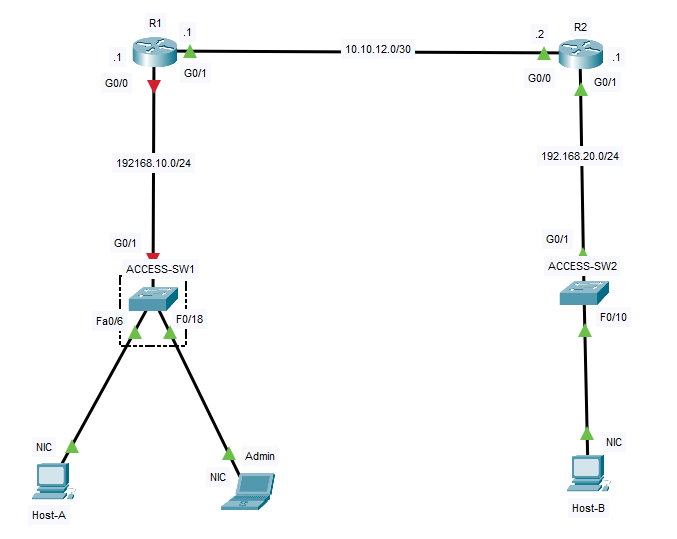
IP ADDRESSING TABLE
| Device | Interface | IP Address | Subnet Mask | Default Gateway |
| R1 | G0/0 | 192.168.10.1 | 255.255.255.0 | N/A |
| R1 | G0/1 | 10.10.12.1 | 255.255.255.252 | N/A |
| R2 | G0/0 | 10.10.12.2 | 255.255.255.252 | N/A |
| R2 | G0/1 | 192.168.20.1 | 255.255.255.0 | N/A |
| ACCESS-SW1 | VLAN 1 | 192.168.10.2 | 255.255.255.0 | 192.168.10.1 |
| ACCESS-SW2 | VLAN 1 | 192.168.20.2 | 255.255.255.0 | 192.168.20.1 |
| Host-A | NIC | 192.168.10.10 | 255.255.255.0 | 192.168.10.1 |
| Admin | NIC | 192.168.10.50 | 255.255.255.0 | 192.168.10.1 |
| Host-B | NIC | 192.168.20.10 | 255.255.255.0 | 192.168.20.1 |
TROUBLESHOOTING CHALLENGE
Troubleshooting Scenario
You have been assigned to investigate intermittent and failed connectivity in a small branch network.
TIP: In Packet Tracer, you must trust the interface output — not the behavior
Users report the following issues:
- Host-A can sometimes reach its local gateway, but performance is very poor
- Large ping tests between Host-A and Host-B show packet loss
- Host-A cannot consistently reach Host-B
- Admin-PC can access local devices, but remote communication is unreliable
- Host-B cannot communicate with remote devices outside its local LAN
The physical cables are connected, and most interfaces appear operational.
Your task is to identify and correct the problems using standard CCNA troubleshooting methods.
Student Requirements
Investigate the network using commands such as:
Troubleshooting Goals
- Restore stable Ethernet communication on the LAN-facing link
- Correct all IPv4 addressing issues
- Restore end-to-end communication between Host-A and Host-B
- Ensure routing and default gateway behavior are correct
Notes for the Student
Do not assume that an interface shown as up/up is operating correctly.
Check both Layer 2 and Layer 3 carefully.
Look for small configuration mistakes that produce major connectivity symptoms.
Complete Lab Outcome
This lab gives CCNA students practice with two very common real-world causes of connectivity failure:
- duplex mismatches, which create poor Ethernet performance even when links are operational
- IPv4 addressing errors, which prevent hosts and routers from making correct forwarding decisions
The scenario is compact, reproducible in Cisco Packet Tracer, and suitable for both guided practice and challenge-based troubleshooting.