
LAB OBJECTIVES
By the end of this lab, the student will be able to:
- Verify switch port status using Cisco IOS commands
- Identify Layer 1, Layer 2, and Layer 3 symptoms related to switch connectivity
- Troubleshoot copper and fiber-style media issues using interface statistics
- Detect duplex and speed mismatches on Ethernet links
- Restore end-to-end connectivity by correcting intentional switch port and media faults
DEVICE DETAILS
| Device | Role |
|---|---|
| R1 | Edge Router |
| SW1 | Access Switch |
| SW2 | Distribution Switch |
| Host-A | User PC |
| Host-B | User PC |
| SRV-1 | Internal Server |
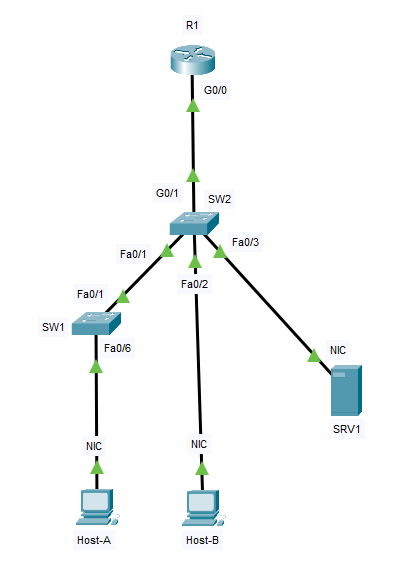
NETWORK TOPOLOGY
| Device A | Interface | Device B | Interface | Cable Type |
|---|---|---|---|---|
| Host-A | Fa0 | SW1 | Fa0/6 | Copper Straight-Through |
| SW1 | Fa0/1 | SW2 | Fa0/1 | Copper Crossover |
| Host-B | Fa0 | SW2 | Fa0/2 | Copper Straight-Through |
| SRV-1 | Fa0 | SW2 | Fa0/3 | Copper Straight-Through |
| SW2 | G0/1 | R1 | G0/0 | Copper Straight-Through |
Topology notes
- SW1 and SW2 are connected through an Ethernet uplink.
- Host-A is attached to SW1.
- Host-B and STV-1 are attached to SW2.
- R1 provides Layer 3 gateway services for VLAN 10 and management reachability.
TOPOLOGY DIAGRAM
IP ADDRESSING TABLE
| Device | Interface | IP Address | Subnet Mask | Default Gateway |
|---|---|---|---|---|
| R1 | G0/0.10 | 192.168.10.1 | 255.255.255.0 | N/A |
| R1 | G0/0.99 | 192.168.99.1 | 255.255.255.0 | N/A |
| SW1 | VLAN 99 | 192.168.99.11 | 255.255.255.0 | 192.168.99.1 |
| SW2 | VLAN 99 | 192.168.99.12 | 255.255.255.0 | 192.168.99.1 |
| Host-A | NIC | 192.168.10.10 | 255.255.255.0 | 192.168.10.1 |
| Host-B | NIC | 192.168.10.20 | 255.255.255.0 | 192.168.10.1 |
| Server-1 | NIC | 192.168.10.100 | 255.255.255.0 | 192.168.10.1 |
VLAN plan
| VLAN | Name | Purpose |
|---|---|---|
| 10 | USERS | End devices |
| 99 | MGMT | Switch management |
CCNA-STYLE TROUBLESHOOTING CHALLENGE
Troubleshooting Switch Port and Media Problems
Cisco Packet Tracer Simulation
Download the Lab File
This lab was created in Cisco Packet Tracer.
Download .PKT FileRequirements
- Cisco Packet Tracer installed
- Download the .pkt file
- Open the file in Packet Tracer
Troubleshooting Scenario
You have been assigned to investigate user complaints in a small office network.
The following symptoms are reported:
- Host-A (192.168.10.10) cannot reliably reach Host-B (192.168.10.20)
- Host-B 192.168.10.20) cannot reach SRV1-1 (192.168.10.100)
- The administrator cannot always reach SW2 using its management IP (192.168.99.12)
- At times, the uplink between switches appears active, but performance is poor
Your task is to identify and correct the problems using a structured troubleshooting approach.
Requirements
⚠️ Do not erase the configurations and start over. ⚠️
You must investigate and repair the network using normal CCNA troubleshooting logic.
Suggested troubleshooting workflow
- Identify whether the failure is Layer 1, Layer 2, or Layer 3
- Check interface status first
- Review duplex and speed values on both ends of uplinks
- Inspect VLAN membership and trunk operation
- Verify management addressing and default gateway settings
- Test reachability after each correction
- Save the corrected configuration
Commands you should use
show ip interface brief
show interfaces
show interfaces fastEthernet0/1
show interfaces fastEthernet0/2
show interfaces trunk
show vlan brief
show running-config
ping
traceroute
show mac address-table
Your goals
- Restore connectivity between Host-A and Host-B
- Restore connectivity between Host-B and SRV-1
- Restore management reachability to SW2
- Eliminate the switch uplink performance problem
- Save the working configuration
Final correct state summary
You’re successful when:
- SW2 Fa0/2 is enabled
- SW1 and SW2 uplink duplex/speed settings match
- Host-B is in VLAN 10
- SW2 default gateway is 192.168.99.1
- SW2 Gi0/1 trunk allows VLANs 10 and 99
- Host-A, Host-B, SRV-1, SW1, SW2, and R1 can all communicate as expected
This lab is designed to practice the exact concepts from your material:
- OSI-based troubleshooting
- copper media symptoms
- CRC/collision interpretation
- duplex and speed mismatch detection
- switch port shutdown recovery
- management IP troubleshooting
- structured CCNA-style troubleshooting logic
[Return to CCNA Study Hub]